

The short answer: When you hire an employee who will work in another state, do not assume your existing payroll registration covers that employee. Employers may need to establish payroll tax accounts in the employee's work state before correctly withholding, depositing, and reporting applicable state payroll taxes. Your exact obligations depend on the state and the employee's work arrangement.
You just hired a great remote employee in another state. Now you need to know which state agencies must hear about it, what each one requires, and how soon. A missed registration can mean penalties, back taxes, and payroll corrections after the fact.
At Lift HCM, we have helped hundreds of organizations set up multistate accounts and build compliance workflows that hold up as they grow.
This guide walks through state payroll tax registration step by step, from payroll nexus and unemployment insurance to local taxes and Illinois specifics, so you can register correctly before your first out-of-state payroll run.
Key Takeaways
-
Payroll tax obligations generally follow where employees work, not your headquarters.
-
One out-of-state hire can create payroll nexus. Confirm registration requirements before running payroll.
-
State withholding and unemployment insurance (SUI) usually require separate registrations.
-
Check local taxes, reciprocity rules, and deadlines to avoid penalties and payroll corrections.
-
Expert support and unified HCM technology can simplify multistate payroll.
-
Reciprocity can change income tax withholding, but not SUI or local tax obligations.
Table of Contents
-
Why Does State Payroll Tax Registration Matter for Your Business?
-
What Common Mistakes Do Businesses Make with Multi-State Payroll?
- What Should Illinois Employers Know About Payroll Tax Registration?
-
Frequently Asked Questions About State Payroll Tax Registration
-
How Can You Master State Payroll Tax Registration and Protect Your Business?
What Is State Payroll Tax Registration?
State payroll tax registration is the official legal process of registering your business with a state government so you can withhold income taxes and pay unemployment taxes for employees working in that state. When you complete this process, state agencies assign your business unique state account numbers and, for unemployment insurance, a specific tax rate.
Every state has its own set of rules, tax brackets, and filing portals. Registration ensures that state income taxes deducted from your employee's paycheck are correctly sent to the appropriate state tax agency, often the Department of Revenue. It also ensures that your company pays required state unemployment insurance contributions to the state labor department. Without completing registration, your company cannot properly withhold taxes or file quarterly tax reports in that jurisdiction.
Why Does State Payroll Tax Registration Matter for Your Business?
State payroll tax registration helps your business avoid costly errors, meet filing obligations, and protect employee trust. Without proper registration, you face three key risks:
-
Financial Risks: Late registration can trigger penalties, retroactive tax assessments, and statutory interest on unpaid taxes. Depending on state law, owners and responsible corporate officers may also face personal liability for unremitted trust fund taxes.
-
Compliance Risks: Operating without active state tax IDs disrupts quarterly reporting and unemployment claim administration. Unregistered employers are often flagged during routine state tax audits or when a former employee files for unemployment benefits.
-
Employee Experience Risks: Withholding for the wrong jurisdiction leaves workers vulnerable to unexpected state tax bills, double taxation, or delayed refunds at year-end. Correct registration ensures accurate W-2 reporting and maintains team trust.
This guide focuses on the initial registration process. For ongoing withholding, remittance, and recordkeeping requirements, explore our multi-state payroll tax compliance guide.
What Are the Key Concepts You Must Know Before Registering?
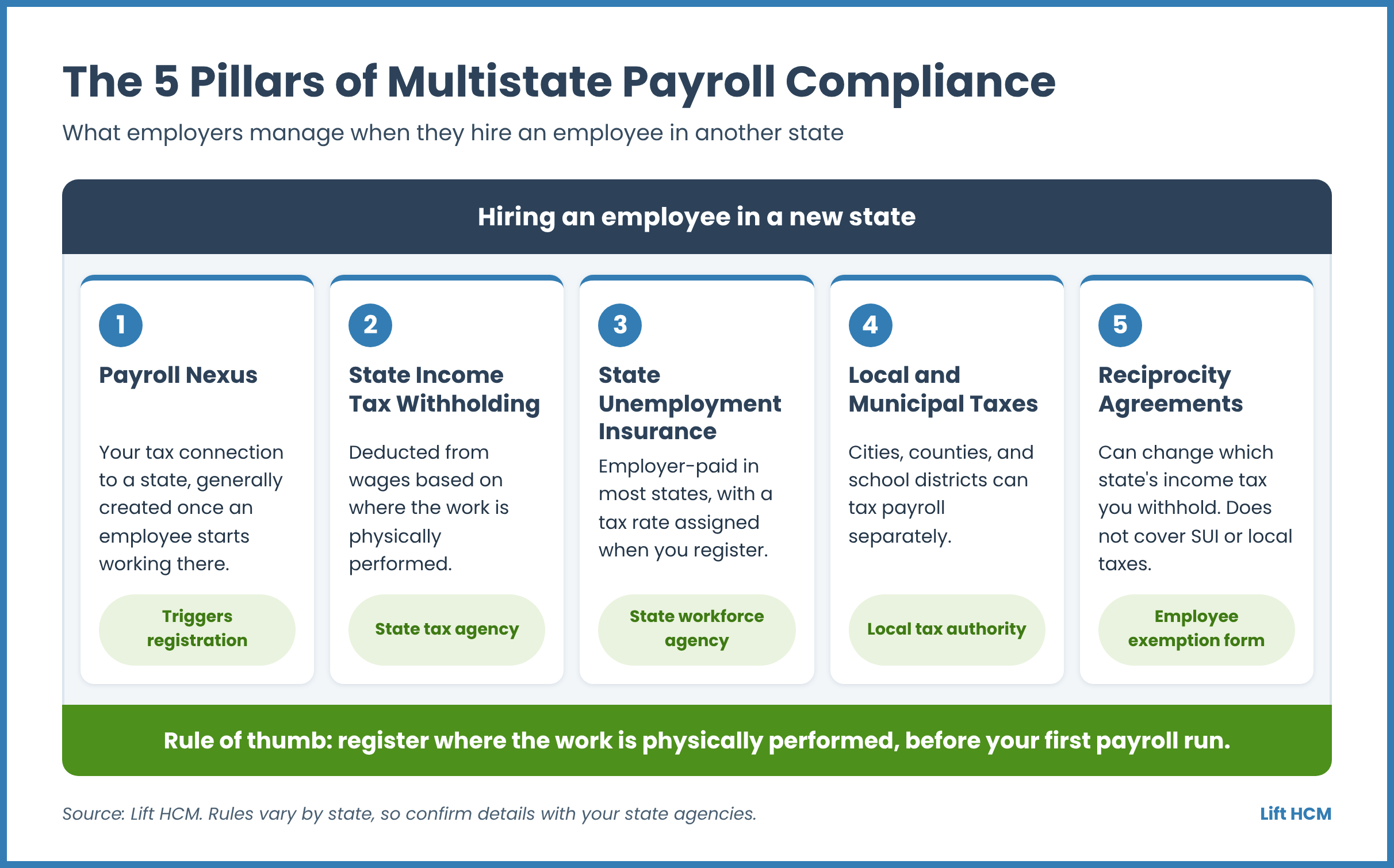
Before starting the registration process, you must understand five fundamental payroll concepts that govern multi-state employment.
1. Payroll Nexus
Payroll nexus is the legal connection between your business and a state government that gives the state authority to tax your company. While sales tax nexus is often created by sales volume, payroll nexus is generally established as soon as an employee starts performing work inside a state's borders. Even one part-time or full-time remote worker generally creates an official physical presence for your business in that state. A new employee can also trigger other obligations, such as business registration or corporate tax filings, so confirm the full picture with your CPA or tax advisor.
2. State Income Tax (SIT) Withholding
State income tax withholding is the money employers must deduct from employee wages generally based on where work is physically completed. Key rules include:
- Resident Withholding: Applies to workers who live permanently in the state.
- Nonresident Withholding: Applies when an employee lives in one state but travels to another state to perform work.
- Convenience of the Employer Rule: Some states tax remote employees’ wages based on the employer’s location unless remote work is a business necessity. Connecticut and New Jersey generally apply this rule only to residents of states with similar rules. Requirements and exceptions vary, so confirm with the state tax agency.
3. State Unemployment Insurance (SUI / SUTA)
State Unemployment Tax Act contributions fund state unemployment benefit programs for laid-off workers. SUI is employer-paid in most states, although Alaska, New Jersey, and Pennsylvania also require small employee contributions. When you register with the state labor department, you receive a "New Employer SUI Rate." Over time, this rate generally goes up or down based on how many unemployment claims are charged to your account, along with other state-specific factors. Employers typically pay SUI to only one state per employee, based on where the employee's work is localized.
4. Local and Municipal Taxes
Thousands of local jurisdictions, including cities, counties, and school districts, collect their own local payroll taxes. States like Pennsylvania, Ohio, Kentucky, and Maryland have complex local tax structures. Employers must register with local tax authorities and calculate separate local withholdings based on exact physical addresses. State reciprocity agreements generally do not cover local taxes.
5. Reciprocity Agreements
Reciprocity agreements are special legal compacts between neighboring states that help prevent double taxation for cross-border commuters. Under a reciprocal agreement, an employee who lives in State A and works in State B can request home state income tax withholding instead of work state tax withholding by submitting a state non-residence form. Reciprocity applies to income tax withholding only. It does not remove SUI registration or local tax duties.
How Do You Register for State Payroll Taxes Step-by-Step?
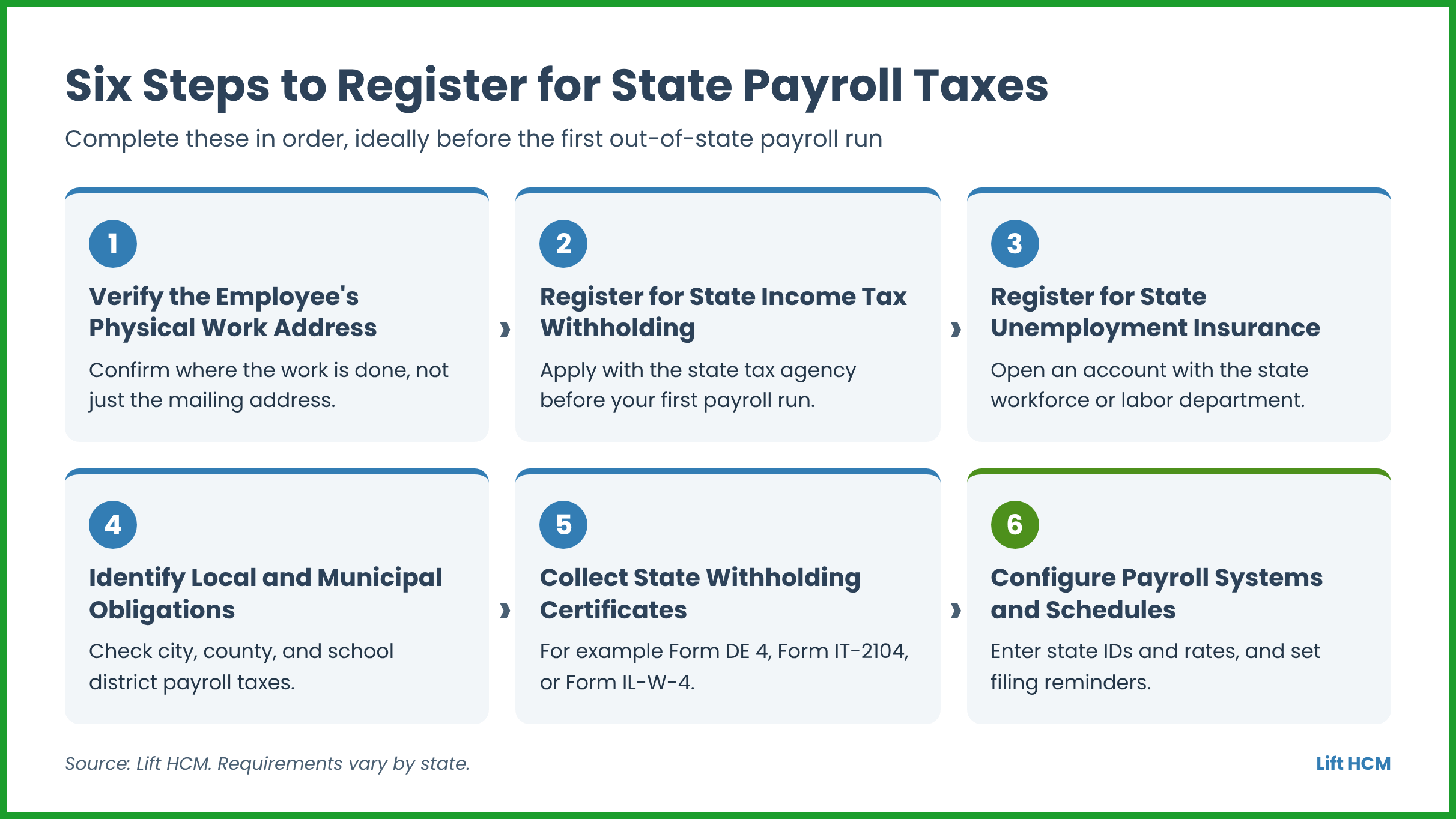
Registering for state payroll taxes requires a systematic step-by-step approach to help you stay compliant with every agency involved. Start as soon as you confirm a remote hire's work location, because state accounts generally need to be in place before the first payroll run. Deadlines vary by state. For example, Ohio asks employers to file Form IT 1 within 15 days of the date their withholding liability begins, and Illinois asks new employers to register with IDES within 30 days of start-up.
Step 1: Verify the Employee's Physical Work Address
Start by confirming the exact address where your employee will perform their daily duties. Do not rely solely on a mailing address or the residential address listed on a resume. Remote employees sometimes work from secondary homes, co-working facilities, or family residences. Accurate physical address tracking ensures you register with the correct state and local tax authorities.
Step 2: Register for State Income Tax (SIT) Withholding
Submit an official business tax application with the target state's Department of Revenue or Taxation before processing your first payroll run. Many state agencies offer online registration portals. After approving your application, the state issues a state withholding account number and sets your tax deposit schedule.
Step 3: Register for State Unemployment Insurance (SUI / SUTA)
Create a separate employer account with the state workforce or labor department. This registration establishes your SUI account number, assigns your initial tax rate, and sets up your account for quarterly wage reporting and tax contributions. Some states let you complete both registrations in one online portal, such as MyTax Illinois, but they are still separate registrations, so check each agency's requirements.
Step 4: Identify Local and Municipal Payroll Tax Obligations
Check the employee's physical work location against city and county tax databases to determine if local taxes apply. If required, complete separate local registrations for municipal income taxes, occupational license fees, or local school district taxes.
Step 5: Collect State-Specific Tax Withholding Certificates
Provide your new employee with state-specific withholding forms, such as Form DE 4 in California, Form IT-2104 in New York, or Form IL-W-4 in Illinois. If the state does not have its own form, have the employee complete the federal Form W-4 and confirm how the state wants it used to set up their tax profile.
Step 6: Configure Payroll Systems and Reporting Schedules
Input your state tax IDs, assigned SUI rates, and tax deposit frequencies into your payroll software. Set up internal calendar alerts for quarterly reconciliation returns, annual W-2 reporting deadlines, and state tax filing cutoffs.
What Common Mistakes Do Businesses Make with Multi-State Payroll?
Businesses frequently make preventable compliance errors when managing remote employee payroll across multiple states.
-
Registering Taxes Late: Many employers wait months after an employee starts working before registering with state tax agencies. Late registration can trigger failure-to-file penalties, interest charges, and back tax bills.
-
Withholding for the Wrong State: Some companies mistakenly report taxes to their home state instead of the employee's physical work state. This can lead to double-taxation issues, tax audits from both states, and complex filing corrections.
-
Overlooking Local Taxes: Employers often remember state-level taxes but forget city, county, or school district taxes. Unpaid local taxes can build up quietly over time, resulting in unexpected tax liens and fines.
-
Ignoring Employee Relocations: Remote workers sometimes move to new cities or states without telling HR. If an employee moves and payroll is not updated, your business can unknowingly fall out of compliance in the new state.
-
Misclassifying Employees as Independent Contractors: Attempting to avoid multi-state payroll registration by classifying remote workers as 1099 contractors can cause serious legal trouble. If tax agencies determine the worker is an employee, your business can face significant misclassification fines and back taxes.
|
Common Pitfall |
Business Impact |
Recommended Best Practice |
|
Late State Registration |
Penalties, statutory interest, tax audits |
Register before running initial out-of-state payroll |
|
Reporting Taxes to Home State |
Double taxation, employee tax filing errors |
Track physical work location for every employee |
|
Missing Local Taxes |
Unpaid local liability, municipal tax fines |
Use automated address geocoding in payroll software |
|
Unannounced Worker Relocation |
Operating out of compliance in new state |
Require employees to notify HR before they change work location |
How Can You Manage Multi-State Payroll Taxes Effectively?
Managing multi-state payroll taxes effectively requires proactive policies, structured technology, and routine internal audits.
First, implement a clear remote work location policy. Require all employees to notify HR before they change their work location to a new city or state. Your team should evaluate the tax registration costs, local labor laws, and corporate filing requirements of the new state before approving work from the new location.
Second, establish a routine quarterly location audit. Ask all remote team members to verify their primary physical work address inside your employee portal. This simple check helps ensure that active payroll tax profiles match actual work locations.
Third, use modern payroll and tax management software with clean HR and payroll integrations. Automated payroll software calculates multi-state tax rates, tracks local tax changes, and automates quarterly tax filings so your internal team avoids manual data entry errors.
Fourth, ask about other state programs. Some states also run programs such as paid family and medical leave, state disability insurance, or new hire reporting that can require separate registrations or filings. Ask each state's agencies or your payroll provider for the full checklist.
Finally, maintain organized digital records of all state tax registration letters, assigned SUI rates, employee withholding certificates, and state agency notices. Having easy access to these documents makes tax reconciliations and annual audits much easier.
What Should Illinois Employers Know About Payroll Tax Registration?
Employers that withhold Illinois income tax generally register with the Illinois Department of Revenue (IDOR) by completing Form REG-1, Illinois Business Registration Application. Registration can be completed online through MyTax Illinois or by submitting a paper Form REG-1. IDOR states that organizations withholding Illinois income tax for Illinois employees must register, subject to limited exceptions.
Illinois unemployment insurance is administered separately by the Illinois Department of Employment Security (IDES). Employers can establish an unemployment insurance account through MyTax Illinois or submit Form REG-UI-1, Report to Determine Liability Under the Illinois Unemployment Insurance Act. Although both registrations can be initiated through MyTax Illinois, income-tax withholding and unemployment insurance are separate accounts administered by different agencies.
IDES requires a newly created employing unit to register within 30 days after commencing business in Illinois. Employers hiring their first Illinois employee should confirm when their Illinois unemployment insurance obligation begins and complete the required registration promptly.
Illinois has reciprocal income-tax withholding agreements covering residents of Iowa, Kentucky, Michigan, and Wisconsin. Eligible employees who receive compensation in Illinois may submit Form IL-W-5-NR to their Illinois employer to claim an exemption from Illinois income-tax withholding. The employer must keep the form on file.
Reciprocity applies to Illinois income-tax withholding. It should not be treated as a blanket exemption from unemployment insurance, local taxes, business registration, or other employer obligations. Employers should review the employee’s residence, physical work location, and applicable agency requirements before configuring payroll.
For remote employees, review both the work-state and residence-state rules before processing payroll. Confirm current registration, withholding, unemployment insurance, and reporting requirements directly with IDOR, IDES, and the appropriate agencies in the employee’s work state.
What Should You Look for in a Multi-State Payroll Solution?
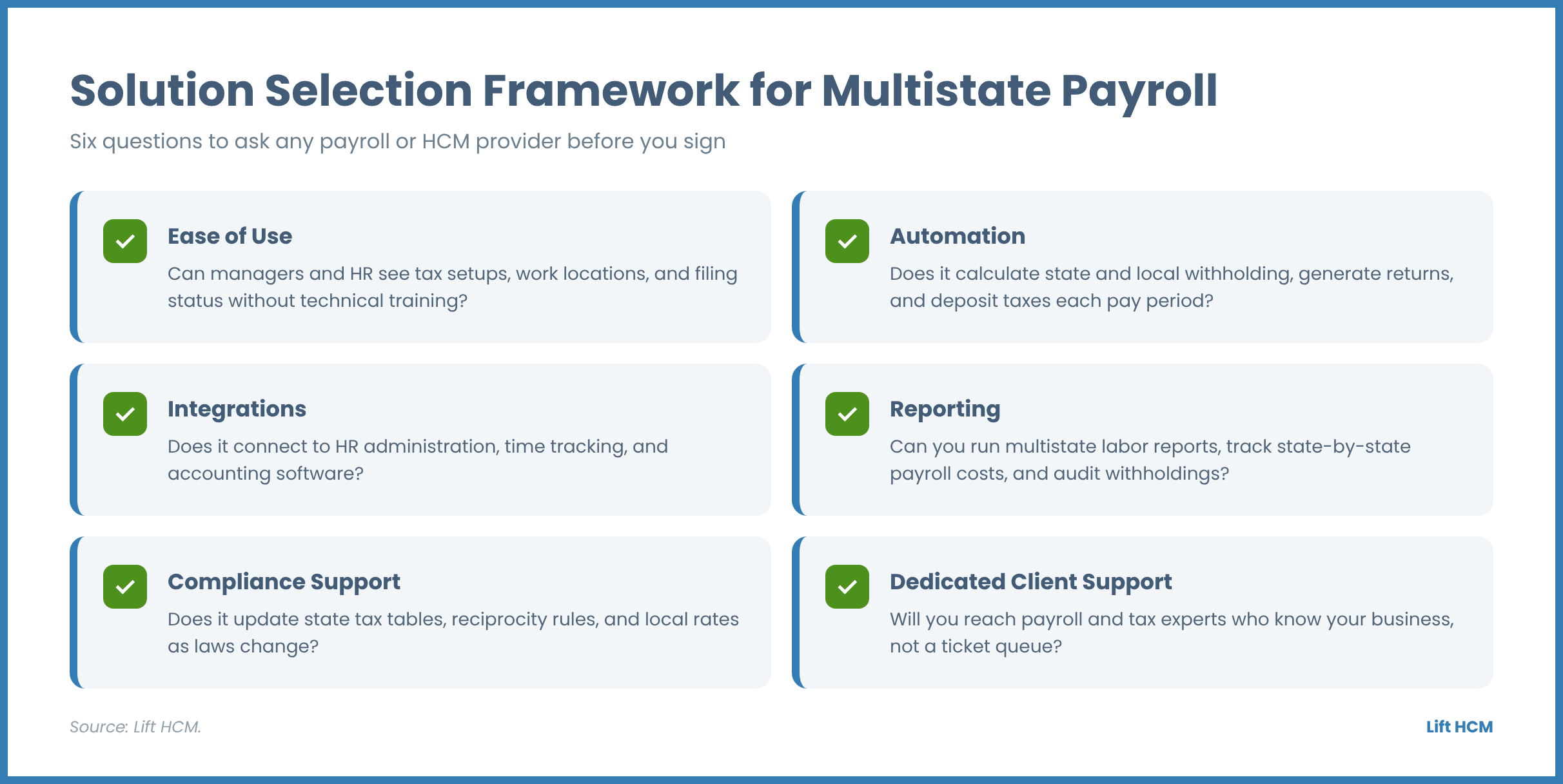
When evaluating a multi-state payroll technology or service partner, look for key capabilities that eliminate administrative complexity and protect your business.
Ease of Use: The platform should feature an intuitive, simple interface where managers and HR teams can view employee tax setups, location profiles, and filing statuses without needing extensive technical training.
Automation: Look for system automation that calculates complex state and local tax withholdings, generates state returns, and deposits tax payments automatically each pay period.
Integrations: Your payroll platform must connect seamlessly with your overall HR administration, time tracking tools, and accounting software to keep workforce data aligned across systems.
Reporting: Robust reporting capabilities allow executives to run detailed multi-state labor reports, track state-by-state payroll expenses, and audit tax withholdings in real time.
Compliance Support: The technology should automatically update state tax tables, reciprocity rules, and local tax rates as state laws change throughout the year.
Dedicated Client Support: Choose a partner that offers direct access to dedicated payroll and tax experts who know your business by name rather than routing you to an anonymous call center or ticket queue.
Frequently Asked Questions About State Payroll Tax Registration
Which state agencies do you need to register with for a remote employee?
Generally, you register with the state tax or revenue department for income tax withholding (if the state has an income tax) and with the state workforce or labor agency for unemployment insurance. You may also need to register with local tax authorities and, in some states, with agencies that run paid leave or disability programs. Requirements differ by state, so confirm each agency’s rules before your first payroll run.
Do you need to register in a state if you only have one remote employee there?
Generally, yes. Even one employee working in a state typically creates payroll tax obligations, including unemployment insurance registration and, in states with an income tax, withholding registration. Confirm the specific requirements with the state's tax and workforce agencies before your first payroll run.
How long does state payroll tax registration take?
State payroll tax registration can take anywhere from same-day online approval to several weeks, depending on the state agency and how you apply. Many states offer fast online registration, while others rely on paper applications or manual reviews that take longer, so start as soon as you confirm the employee's work location.
Can you register for state payroll taxes after running payroll?
While you can submit late registrations, registering after running payroll is not recommended because it can trigger late filing penalties, statutory interest, and tax notices. If you accidentally run payroll before registering, you should apply for state tax accounts immediately and work with the state agency or a tax professional on any needed corrections to limit back-tax penalties.
Do you need to register in a state if an employee only works there temporarily?
It depends on the state, but temporary work can create payroll tax obligations. Many states require income tax withholding if an employee works within their borders for a specific number of days, while other states enforce withholding immediately regardless of duration.
How do reciprocity agreements affect state tax registration?
Reciprocity agreements allow employers to withhold home state income tax instead of work state income tax for cross-border workers, but they do not eliminate all registration requirements. Even with a reciprocal agreement in place, employers generally must still register for state unemployment insurance (SUI) in the state where the employee's work is localized, which is usually where it is physically performed. Reciprocity also does not cover local taxes.
How does Lift HCM handle multi-state payroll tax filing?
Lift HCM automates state and local tax calculations, deposits tax payments, and files quarterly returns for the states where you have employees. Our platform applies state reciprocity rules based on each employee's home and work state and connects you with a dedicated client service manager to guide you through new state registrations.
Can Lift HCM integrate with time tracking and recruiting tools for remote workers?
Yes, Lift HCM offers a fully unified platform that connects multi-state payroll with workforce management and time tracking, benefits administration, and an applicant tracking system (ATS) so worker data flows smoothly from hiring through payroll.
Does Lift HCM work with CPA firms and advisor partners?
Yes, Lift HCM maintains a dedicated partner program designed for CPAs, benefits brokers, and financial advisors who want to provide dependable HCM solutions and white-glove service to their business clients without competing for advisory services.
How Can You Master State Payroll Tax Registration and Protect Your Business?
Managing state payroll tax registration and multi-state compliance does not have to be a stressful or confusing process for your leadership team. With clear internal policies, automated payroll technology, and a structured registration process, your business can hire top remote talent anywhere in the country with confidence.
At Lift HCM, we have helped hundreds of growing organizations eliminate payroll headaches, stay compliant across state lines, and streamline their administrative workflows. Whether you are hiring your first out-of-state employee or managing a large national workforce, our dedicated experts and unified HCM platform are ready to support your business every step of the way.
Explore our comprehensive payroll and tax management solutions or schedule a free consultation with a Lift HCM expert today to simplify your multi-state payroll compliance.

This information is for educational purposes only and is not intended to replace legal counsel. Payroll tax requirements vary by state and locality and change over time, so confirm current requirements with your state tax agency, state labor department, or legal counsel.