
Manual payroll compliance risks are financial, legal, and operational liabilities caused by human error, outdated tax tables, and manual processes for tracking employee hours and payroll taxes. Key risks include IRS failure-to-deposit penalties (2% to 15% of the unpaid deposit), payroll tax calculation errors, worker misclassification, FLSA wage-and-hour violations, and personal liability under the IRS Trust Fund Recovery Penalty (TFRP), which can equal 100% of the unpaid trust fund taxes. The fix is a payroll process that calculates, deposits, files, and documents automatically.
If you're still running payroll on spreadsheets or basic accounting software, you're not alone. Many small and mid-sized business owners start there, because it's what they know and it feels manageable when you have just a few employees. But as your team grows, so does the risk. Manual payroll processing is one of the fastest ways to land your business in compliance trouble, and the consequences go far beyond a late-night scramble to fix a miscalculation.
At Lift HCM, we've helped dozens of businesses transition from manual payroll to automated systems, and we've seen what happens when companies wait too long to make that move. This guide breaks down the specific compliance risks that come with manual payroll, explains how those risks turn into real penalties and audits, and walks you through the steps to build an automated, audit-ready payroll process.
Key Takeaways
- Manual Payroll Risks: Manual processes and disconnected systems lead to tax errors, missed deadlines, misclassifications, and incorrect overtime—exposing companies to audits and penalties.
- Costly Non-Compliance Penalties: Late IRS tax deposits incur penalties from 2% to 15%, while willful non-payment risks a 100% Trust Fund Recovery Penalty. State laws (like Illinois' 5%/month unpaid wage penalty) add steep financial liability.
- Strict Record Retention: Maintain FLSA wage-calculation records for 2 years, FLSA payroll records for 3 years, and employment tax records for at least 4 years.
- Automation Requires Oversight: Integrated payroll software reduces manual errors, but accurate initial setup, updated tax tables, and regular reviews remain essential.
- System Migration Strategy: A smooth payroll transition requires a upfront data audit, reconciliation, parallel test runs, and thorough team training before go-live.
Table of Contents
-
What Do Illinois Employers Need to Know About Payroll Compliance Risks?
-
What Are the Hidden Costs of Manual Payroll Beyond Penalties?
-
How Does Automated Payroll Tax Reporting Reduce Compliance Risk?
-
How Do You Transition from Manual Payroll to an Automated System?
What Is Manual Payroll Processing?
Manual payroll processing means calculating employee wages, tax withholdings, and deductions by hand, typically using spreadsheets, paper timesheets, and standalone calculators. You're responsible for tracking hours, looking up the correct federal and state tax rates, computing overtime, applying deductions, and then filing the right forms with the IRS and state agencies on time.
For a business with one or two employees, this might seem doable. But manual payroll doesn't scale well. Every additional employee, every new state where someone works, and every change in tax law adds another opportunity for error.
The core problem with manual payroll is that it depends entirely on human accuracy and memory, two things that fail under pressure. And when payroll errors happen, they don't just affect your bottom line. They can trigger government penalties, damage employee trust, and expose your business to legal risk.
What Compliance Risks Does Manual Payroll Create?
Manual payroll introduces compliance risks at every stage of the payroll process: calculating wages, withholding taxes, making deposits, filing returns, and keeping records. Here's a breakdown of the most common, and most costly, risk areas.
Tax Calculation Errors
When you calculate payroll taxes by hand, you're responsible for applying the correct federal income tax withholding based on each employee's W-4, plus the correct Social Security and Medicare (FICA) rates. You also need to track when an employee's wages hit the Social Security wage base limit, stop withholding at the right time, and begin the additional Medicare tax for high earners.
A single mistake, such as using an outdated tax table, miscalculating overtime, or forgetting to include a bonus in taxable wages, creates a ripple effect. You'll either under-withhold (leaving your business liable for the shortfall) or over-withhold (reducing your employee's take-home pay and creating frustration).
Late or Missed Tax Deposits
The IRS requires employers to deposit withheld federal income tax and FICA taxes on a strict schedule, either monthly or semi-weekly, depending on the size of your tax liability during a "lookback period." Missing a deposit deadline, even by a day, can trigger a penalty.
The IRS failure-to-deposit penalty is a percentage of the taxes you did not deposit on time, in the right amount, or in the right way. Here are the current IRS penalty tiers:
|
How late is the deposit? |
Penalty |
|
1 to 5 calendar days late |
2% of the unpaid deposit |
|
6 to 15 calendar days late |
5% of the unpaid deposit |
|
More than 15 calendar days late |
10% of the unpaid deposit |
|
More than 10 calendar days after your first IRS notice, or the day you receive a notice demanding immediate payment |
15% of the unpaid deposit |
Note: the tiers do not add together. If a deposit is more than 15 days late, the penalty is 10%, not 2% plus 5% plus 10%. Because the percentage applies to the unpaid deposit, a $10,000 deposit made seven days late would carry a 5% penalty of $500, and the IRS also charges interest on penalties.
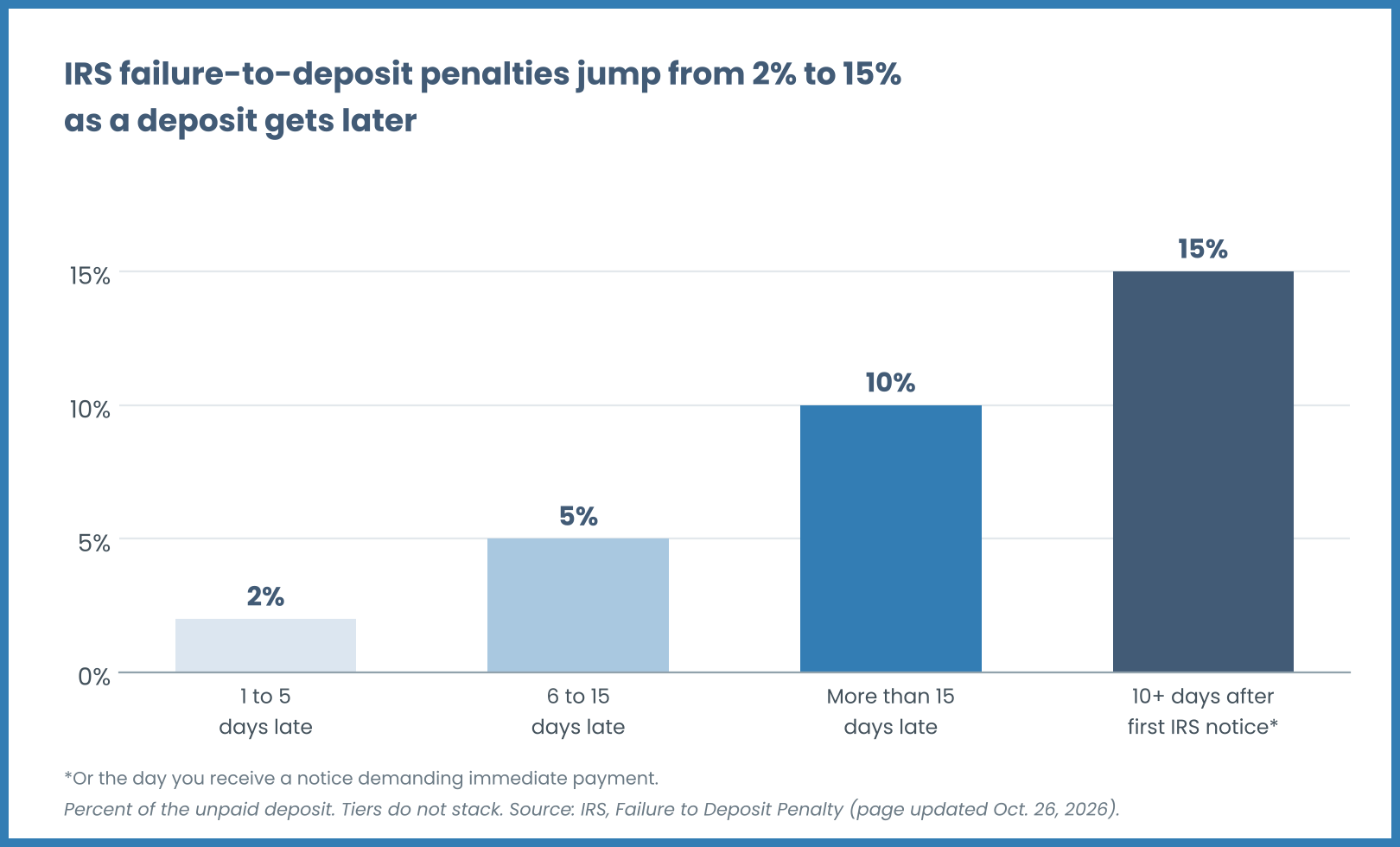
With manual payroll, keeping track of deposit schedules, especially when they change as your business grows, becomes a serious challenge. One overlooked deadline can get expensive fast: on a $20,000 deposit, a 15% penalty is $3,000, before interest.
Filing Errors and Missed Deadlines
Beyond deposits, employers must file quarterly and annual tax returns. Form 941 (Employer's Quarterly Federal Tax Return) is due four times a year. Form 940 (FUTA tax) is due annually. W-2s must be distributed to employees and filed with the Social Security Administration by January 31.
Manual processes make it easy to miss these deadlines or submit returns with errors, such as mismatched wage totals, incorrect Social Security numbers, or math mistakes. The IRS assesses separate penalties for late filing and for inaccurate information returns.
Recordkeeping Gaps
The Fair Labor Standards Act (FLSA) requires employers to keep payroll records for at least three years, and the records used to calculate wages (such as time cards, wage rate tables, and records of deductions) for at least two years, according to U.S. Department of Labor Fact Sheet #21. The IRS requires employment tax records to be kept for at least four years. Some states have even longer requirements.
With manual payroll, records often end up scattered across spreadsheets, paper files, and email attachments. When an auditor asks to see how you calculated overtime for a specific employee two years ago, pulling that documentation together can be a nightmare, or impossible. For a full breakdown, see our guide to payroll record retention rules.
Worker Misclassification
Manual payroll processes often lack the structure to flag classification issues. If you're treating an employee as an independent contractor (or vice versa), you're setting yourself up for back taxes, penalties, and potential lawsuits. The IRS uses a multi-factor test to determine worker status, and getting it wrong can mean owing years of unpaid employment taxes plus interest.
How Do Manual Payroll Errors Lead to Audits and Penalties?
Payroll errors don't stay hidden forever. The IRS, state tax agencies, and the Department of Labor all have systems in place to catch discrepancies, and when they do, the consequences can be severe.
How the IRS Catches Payroll Mistakes
The IRS cross-references the information you report on quarterly 941 forms with the W-2s you file at year-end. If the numbers don't match, you'll receive a notice. The agency also compares your tax deposits against your reported liability. Late deposits, under-deposits, and patterns of errors can all trigger closer scrutiny.
Other factors can draw closer scrutiny as well, including large swings in payroll from quarter to quarter, a history of late filings, and complaints from current or former employees.
The Trust Fund Recovery Penalty
Here's where things get personal. The federal income tax and FICA taxes you withhold from employee paychecks are considered "trust fund taxes," money you're holding on behalf of the government. If your business fails to remit those taxes, the IRS can assess the Trust Fund Recovery Penalty (TFRP), which equals 100% of the unpaid trust fund taxes.
The TFRP isn't just assessed against the business. It can be assessed against any "responsible person" who willfully failed to collect or pay over the taxes. According to the Internal Revenue Manual, responsibility turns on status, duty, and authority, including the power to decide which creditors get paid, and it is decided on the facts of each case. Owning stock, holding an officer title, or signing checks does not, on its own, make someone responsible. "Willful" includes reckless disregard, and no evil intent is required. If more than one person is responsible, each can be held liable for the full amount, though the IRS collects it only once. Your personal assets, such as your home, car, and bank accounts, can be at risk.
State and Local Enforcement
States have their own enforcement mechanisms for unemployment insurance, disability insurance, paid family leave, and income tax withholding. Some states actively audit employers, especially for worker misclassification. If you're operating in multiple states without proper registration and withholding, you're exposed on multiple fronts.
Wage and Hour Lawsuits
Beyond tax agencies, employees can bring lawsuits for unpaid wages under the FLSA and state wage laws. If your manual payroll process led to miscalculated overtime, missed meal-break pay (where state law requires it), or incorrect deductions, you could owe back wages plus an equal amount in liquidated damages, along with attorney's fees and court costs, according to the U.S. Department of Labor. The FLSA generally allows a 2-year look-back for back wages, extended to 3 years for willful violations.
What Do Illinois Employers Need to Know About Payroll Compliance Risks?
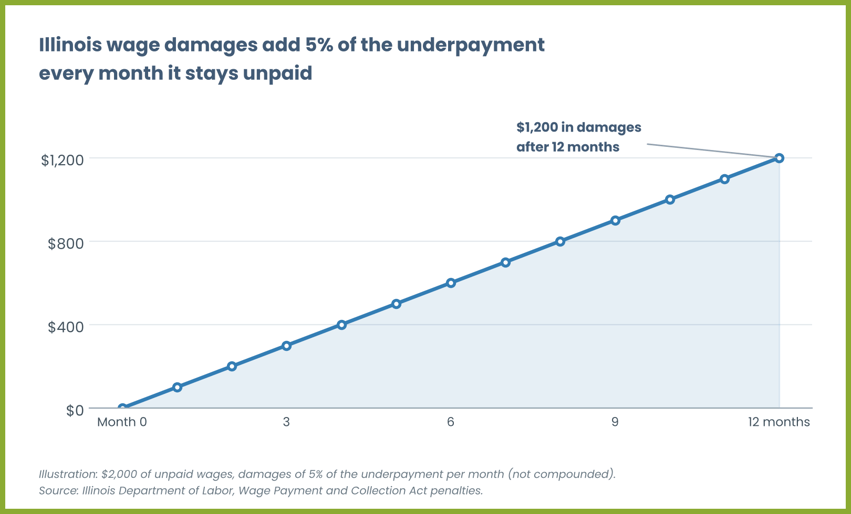
Illinois shows how state law can pile on top of federal exposure, and similar wage payment laws exist in states across the country. Under the Illinois Wage Payment and Collection Act (IWPCA), an employer that underpays an employee owes damages of 5% of the underpayment per month, for each month the wages or final compensation stay unpaid, according to the Illinois Department of Labor.
If the Illinois Department of Labor (IDOL) demands or orders payment and the employer pays late, further penalties apply: 20% of the underpayment, payable to IDOL, and 1% of the underpayment per day, payable to the employee, for each day payment is delayed. IDOL can also charge an administrative fee of $250, which rises to $500 when the amount ordered is more than $3,000 and to $1,000 for orders of $10,000 or more.
Officers and agents are exposed too. Officers of a corporation or agents of an employer who knowingly permit a violation can be held personally liable for the unpaid wages and any assessed fees or penalties. A miscalculated final paycheck or an overtime rate that nobody catches in a spreadsheet can grow quickly.
Illinois employers should also confirm state and local requirements for items such as paid leave and record retention. Our guide to Illinois payroll taxes covers state withholding and registration in more detail.
What Are the Hidden Costs of Manual Payroll Beyond Penalties?
Penalties and back taxes are the visible costs of manual payroll errors. But there are hidden costs that quietly drain your business over time.
Time Spent Fixing Payroll
According to Paylocity's 2026 State of Payroll survey of 776 U.S. HR and finance leaders, 49% of organizations surveyed spend six or more hours each month correcting payroll errors or processing off-cycle payroll adjustments. That’s time teams could otherwise devote to priorities such as hiring, training, and improving operations. Instead, they’re resolving discrepancies and reworking payroll.
Those corrections carry a financial cost, too. A 2026 inflation-adjusted update to EY research commissioned by Paycom estimated the average cost of correcting a single payroll error at $339, up from $291 in the original 2022 study. The underlying survey covered U.S.-headquartered companies with 250 to 10,000 employees, so the estimate is a benchmark, not a fixed cost for every business or every mistake. Repeated errors can add up to thousands of dollars in correction costs over a year.
Payroll Leakage
The cost of fixing mistakes is only part of the picture. Payroll leakage refers to unintended financial losses caused by inefficient processes, system limitations, and other sources of waste, including fraud. A 2026 report from UKG and KPMG states that organizations lose 2% to 4% of total labor spend to payroll leakage, while 38% of surveyed companies reported $1 million to $5 million in annual payroll losses.
businesswire
Those figures reflect enterprise-scale operations. The survey included more than 300 senior leaders at multinational companies with more than 10,000 employees and at least $5 billion in revenue. The findings should not be treated as a prediction for smaller employers. For illustration only, a hypothetical leakage rate of 2% to 4% would equal $20,000 to $40,000 on a $1 million annual labor budget.
businesswire
Leakage can include uncorrected overpayments, duplicate payments, and incorrect deductions. Manual data entry and disconnected systems can make these problems harder to identify and reconcile, allowing losses to recur across payroll cycles.
Employee Trust and Turnover
Payroll errors hit employees where it matters most: their wallets. When someone's paycheck is wrong, their trust in the company takes a hit, and repeated mistakes can push good people to look elsewhere.
In its 2019 article on voluntary turnover, Gallup puts the cost of replacing one employee at one-half to two times that person’s annual salary and calls that range conservative. For illustration, replacing a bookkeeper earning $55,000 a year would cost $27,500 at the low end and $110,000 at the high end.
How Does Automated Payroll Tax Reporting Reduce Compliance Risk?
The solution to manual payroll risk isn't hiring more people to double-check spreadsheets. It's building a system that eliminates the opportunities for error in the first place. Automated payroll and tax reporting does exactly that. Here is where the risk shifts:
|
Risk area |
Manual payroll |
Automated payroll |
|
Tax rates |
Looked up and updated by hand, so outdated tables are easy to miss |
Updated in the system as rates change |
|
Tax deposits |
Tracked on a calendar, so deadlines can slip |
Scheduled from your deposit schedule and submitted electronically |
|
Hours and overtime |
Re-keyed from timesheets |
Time data flows directly into payroll |
|
Filings |
Forms prepared and filed by hand |
Quarterly and annual forms generated and filed |
|
Records |
Scattered across spreadsheets, paper, and email |
Centralized audit trail |
|
Multi-state |
Separate research for each state |
Tax profiles maintained for each jurisdiction |
Real-Time Tax Table Updates
Tax rates and thresholds change regularly. Federal income tax brackets, Social Security wage bases, state withholding rates, and local tax requirements all shift from year to year (and sometimes mid-year). With automated payroll software, these updates happen in the background. You're always calculating taxes based on current rates, not last year's numbers.
Automated Deposit Scheduling
Automated systems track your deposit schedule based on your lookback period and help ensure that tax payments are submitted on time through the IRS's Electronic Federal Tax Payment System (EFTPS). You don't have to remember when deposits are due or manually initiate transfers, because the system handles it.
Integrated Timekeeping
When your time and attendance system feeds directly into payroll, you eliminate the data entry step where many errors occur. Hours worked, overtime, and paid time off are calculated automatically based on rules you configure once. This reduces the risk of manual miscalculations and helps ensure that non-exempt employees are paid correctly for every hour worked.
At Lift HCM, we connect workforce management directly with payroll and tax management, so your data flows from clock-in to paycheck without re-keying. This integration is one of the most effective ways to reduce payroll errors and protect your compliance standing.
Automated Filing and Recordkeeping
Automated payroll systems generate and file your quarterly 941s, annual 940, and year-end W-2s directly with the IRS and Social Security Administration. They also help support compliance with healthcare reporting requirements like ACA Reporting & Affordability Safe Harbors. Furthermore, automated systems maintain a complete audit trail of every payroll run, tax deposit, and filing. When an auditor asks for documentation, you can pull it up in minutes, not days.
Multi-State Compliance Management
If you have employees in multiple states, a reality for many businesses with remote workers, manual payroll becomes exponentially more complex. Each state has its own withholding rates, unemployment insurance rules, paid sick leave requirements, and sometimes local taxes on top of that.
For a deeper look, read our guide: Multi-State Employment Compliance: Managing Remote Employees 2026.
Automated systems handle this complexity by maintaining up-to-date tax profiles for every jurisdiction where you have employees. They apply the correct withholding rules based on each employee's work location and each state's residency and reciprocity rules, not simply where your headquarters is located.
What Does Audit-Ready Payroll Recordkeeping Look Like?
Being "audit-ready" means you can produce accurate, complete documentation for any payroll-related inquiry-from the IRS, a state agency, or even an employee's attorney. Here's what that looks like in practice.
Complete Employee Records
For every employee, you should have on file:
- A completed W-4 (or the latest state equivalent)
- Form I-9 (stored separately from general personnel files for privacy)
- Documentation of their exempt or non-exempt classification, including the analysis that supports it
- Records of all pay rate changes and the effective dates
Detailed Time Records
For every non-exempt employee, maintain daily and weekly records of hours worked. This includes regular hours, overtime hours, and any paid time off used. These records should be timestamped and, ideally, approved by a supervisor before payroll is processed.
Payroll Registers and Tax Documentation
Keep a copy of every payroll register showing gross wages, deductions, and net pay for each employee. Retain copies of all tax deposits (confirmation numbers from EFTPS), filed returns (941, 940, W-2s, W-3s), and any correspondence with tax agencies.
Retention Periods
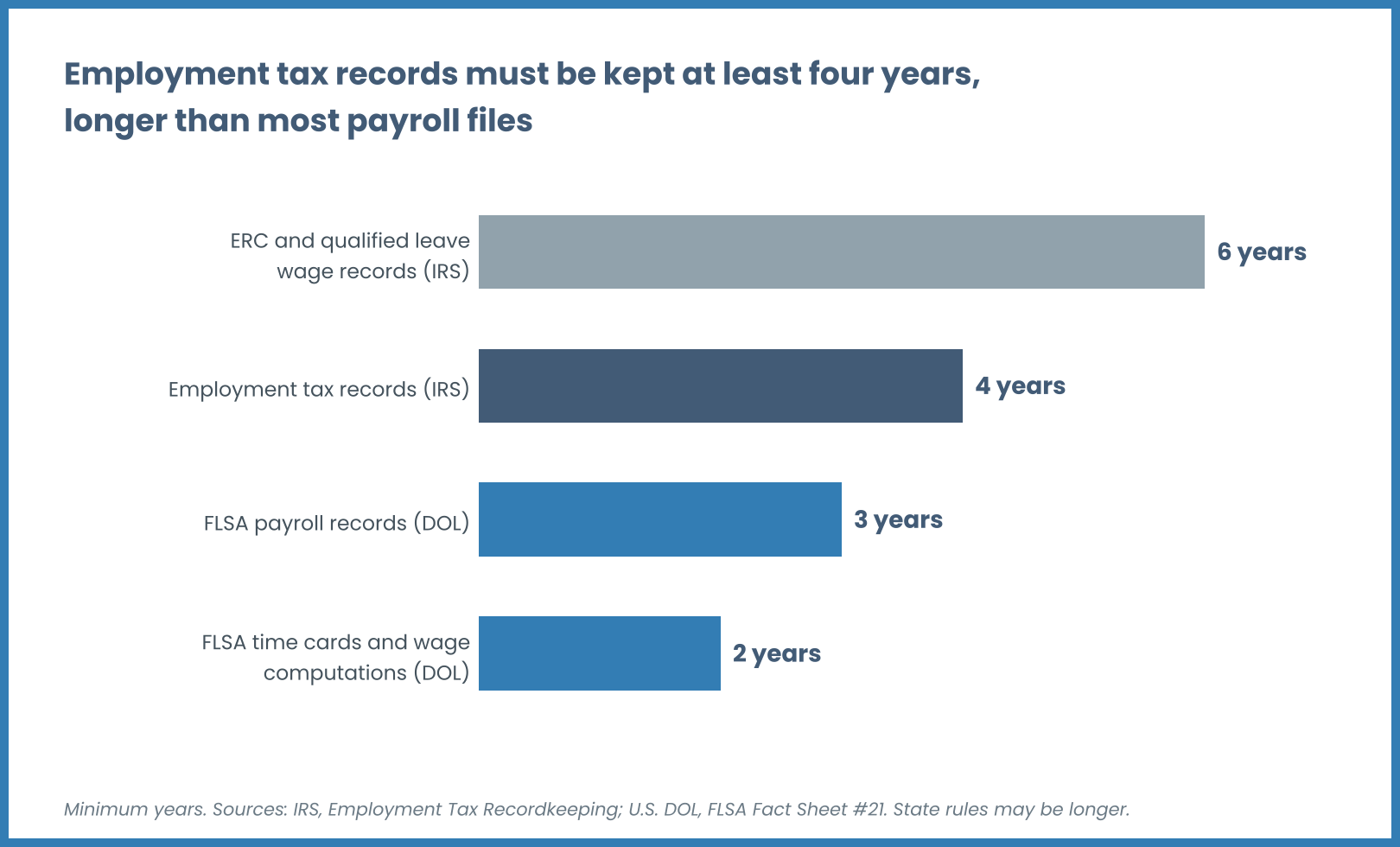
At a minimum, keep employment tax records for at least four years, FLSA payroll records for at least three years, and time cards and wage computation records for at least two. Some records must be kept longer: the IRS says records tied to the employee retention credit and to qualified sick and family leave wages should be kept for at least six years.
📌 Review the official Internal Revenue Service Employment Tax Recordkeeping Guide for full documentation requirements.
Some employers choose to keep records longer to cover potential disputes, and state rules can be longer, so confirm requirements for each state where you have employees. For a full breakdown, see How Long to Keep Payroll Records: FLSA, IRS, & I-9 Rules.
How Do You Transition from Manual Payroll to an Automated System?
Moving from manual payroll to an automated system isn't as daunting as it might seem, especially when you work with a partner who's done it before. Here's a step-by-step framework.
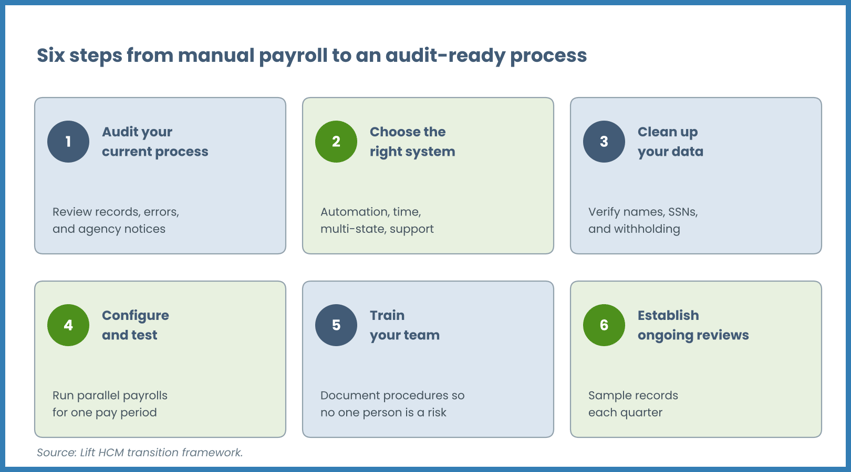
Step 1: Audit Your Current Process
Before you can fix your payroll process, you need to understand what's broken. Review your current payroll records, identify recurring errors, and document any compliance gaps. Look at your deposit history, filing history, and any notices you've received from the IRS or state agencies.
Step 2: Choose the Right Payroll System
Look for a payroll system that offers:
- Automated tax calculations with real-time updates
- Integrated time and attendance
- Automated tax deposits and filings
- Multi-state compliance capabilities
- Complete audit trail and reporting
- Dedicated support from payroll professionals
At Lift HCM, we combine a unified HCM platform with hands-on expert support. Our team doesn't just set you up and disappear. We're available to answer questions, help you navigate complex situations, and help keep your payroll compliant as your business grows.
Step 3: Clean Up Your Data
Before migrating to a new system, clean up your employee data. Verify names, Social Security numbers, addresses, and tax withholding elections. Correct any classification issues. This is also a good time to reconcile your year-to-date payroll figures against your tax filings.
Step 4: Configure and Test
Work with your payroll provider to configure the system for your specific needs: pay schedules, overtime rules, benefit deductions, garnishments, and tax jurisdictions. Run parallel payrolls (processing in both the old and new system simultaneously) for at least one pay period to verify accuracy before fully transitioning.
Step 5: Train Your Team
Make sure everyone who touches payroll understands the new process: how to enter time, how to approve timecards, how to handle exceptions. Document your procedures so that payroll doesn't depend on a single person's knowledge.
Step 6: Establish Ongoing Reviews
Even with an automated system, you should conduct periodic payroll audits. Review a sample of payroll records each quarter to verify accuracy. Stay on top of law changes; your payroll provider should handle the technical updates, but you should understand how those changes affect your business.
What Should You Look for in a Payroll Compliance Partner?
Not all payroll providers are created equal. Here's what separates a true compliance partner from a basic payroll processor.
Proactive Compliance Support
A good payroll partner doesn't just process your payroll. They help you stay ahead of compliance requirements. They alert you to law changes, flag potential issues before they become problems, and guide you through audits if they happen.
Transparent Pricing
Watch out for providers that lure you in with low base rates and then tack on fees for every additional feature. Look for transparent, predictable pricing that includes the compliance features you need: tax filing, multi-state support, and audit-ready reporting.
Dedicated Expert Support
When you have a payroll question, you shouldn't have to wait in a queue or search through a knowledge base. Look for a provider that offers direct access to payroll professionals who know your business.
At Lift HCM, we pride ourselves on relationship-driven service. You'll work with a dedicated team that understands your industry, your challenges, and your goals. We've been helping businesses navigate payroll compliance for decades, and we've seen behind the curtain with all kinds of payroll situations.
Scalable Technology
Your payroll needs today won't be your payroll needs in three years. Choose a provider whose technology can grow with you-adding employees, expanding to new states, integrating with other HR and finance systems.
FAQs About Manual Payroll Compliance Risks
What are the primary compliance risks associated with manual payroll processing?
The primary manual payroll compliance risks include payroll tax calculation errors, late or missed tax deposits, incorrect quarterly or annual filings (Forms 941, 940, and W-2), worker misclassification (1099 vs. W-2), and Fair Labor Standards Act (FLSA) wage-and-hour violations. These errors can trigger IRS failure-to-deposit penalties of 2% to 15% of the unpaid deposit, personal liability under the IRS Trust Fund Recovery Penalty (TFRP), state unemployment audit assessments, and employee back-wage lawsuits.
How much do manual payroll errors and compliance penalties cost employers?
Industry research suggests each payroll error can cost a few hundred dollars to correct, and a 2026 UKG and KPMG survey of large multinationals found organizations lose 2% to 4% of total labor spend to payroll leakage. IRS failure-to-deposit penalties add 2% to 15% of the unpaid deposit depending on how late it is, plus interest, and FLSA violations can add liquidated damages equal to the back wages owed.
Add in potential state penalties, employee lawsuits, and turnover costs, and payroll errors can drain significant resources.
How does Lift HCM automate payroll tax management and compliance?
Lift HCM automates payroll tax management by automatically updating federal, state, and local tax tables in real time, executing automated tax deposits through EFTPS, filing quarterly 941 and annual W-2 returns, and integrating workforce timekeeping to eliminate manual data entry. Our unified platform maintains centralized, audit-ready compliance records and provides dedicated expert payroll support to safeguard employers across multi-state operations.
We also integrate time and attendance directly with payroll, eliminating the re-keying step where many errors happen. And when you have questions, you'll work with dedicated payroll experts who know your business-not a call center.
What is the IRS Trust Fund Recovery Penalty (TFRP) and who is personally liable?
The IRS Trust Fund Recovery Penalty (TFRP) is a penalty equal to 100% of the unpaid trust fund taxes (the income tax and FICA taxes withheld from employee wages), assessed against any "responsible person" who willfully fails to collect or pay them over. The IRS looks at status, duty, and authority, so business owners, corporate officers, and payroll administrators with authority over which bills get paid can be personally liable.
A title or check-signing authority alone does not automatically make someone responsible, but real control over which creditors get paid can. The TFRP can attach to personal assets, making it one of the most serious payroll penalties.
When should a business transition from manual payroll to automated HCM software?
A business should consider moving from manual payroll to automated HCM software as soon as it has more than a handful of employees, hires out-of-state remote workers, or sees frequent payroll corrections and agency notices. Automating before an audit or penalty notice arrives helps avoid costly penalties, protects administrative time, and supports audit-ready record retention as the workforce grows.
The best time to switch is before a problem forces you to. Proactive businesses transition to automated payroll to reduce risk, save time, and build a foundation for growth. Lift HCM helps make that transition smooth and stress-free.
How does multi-state payroll automation handle remote employee compliance?
Automated multi-state payroll software maintains up-to-date tax tables and statutory rules across U.S. jurisdictions, applying state withholding rates, local taxes, unemployment insurance, and paid family leave rules based on each employee's work location and each state's residency and reciprocity rules.
What penalties can Illinois employers face for payroll errors?
Under the Illinois Wage Payment and Collection Act, an employer that underpays wages can owe damages of 5% of the underpayment per month, plus IDOL administrative fees and additional penalties if payment is delayed after a demand or order. Officers and agents who knowingly permit a violation can be held personally liable.
How long do you have to keep payroll records?
Keep employment tax records for at least four years and FLSA payroll records for at least three years. Time cards and wage computation records must be kept at least two years, and some credit-related records for at least six. State rules may be longer, so check each state where you have employees.
How to Move from Payroll Risk to Payroll Confidence
Manual payroll processing creates compliance risk at every step: tax calculation errors, missed deposit deadlines, filing mistakes, and recordkeeping gaps. Those risks translate into real consequences: IRS penalties that can reach 15% of the unpaid deposit, personal liability through the Trust Fund Recovery Penalty, state-level enforcement actions, and wage lawsuits from employees.
The path forward is clear. Automated payroll tax reporting eliminates the manual touchpoints where errors occur. Real-time tax updates, integrated timekeeping, automated deposits and filings, and complete audit trails turn payroll from a source of anxiety into a function you can trust.
That's where we step in. At Lift HCM, we've guided dozens of businesses through the transition from manual payroll to a fully automated, audit-ready process. We combine powerful technology with personalized support, so you're never left guessing about compliance.
Ready to reduce your payroll compliance risk? Talk to our team at Lift HCM to see how we can help you build a payroll process that protects your business and gives you peace of mind.

This information is for educational purposes only and is not intended to replace legal counsel. Confirm current requirements with the IRS, your state labor department, or qualified counsel.
Topics: