

When the auditor calls, and at some point, they will, the difference between a quick review and a stressful scramble often comes down to one thing: your payroll and tax reports. If they're accurate, organized, and ready to hand over, you're in a strong position. If they're buried in spreadsheets or missing key details, you're in for a long few weeks.
 At Lift HCM, we've helped dozens of businesses prepare for audits, and we've seen what separates those who breeze through from those who don't. The good news? Most of the work happens before an auditor ever shows up. That's exactly what this guide is built for: to walk you through the nine payroll and tax reports that demonstrate compliance and help you stay audit-ready year-round.
By the end, you'll know which reports to run, what each one should include, and how the right payroll system can generate them consistently.
Quick Guide: 9 Audit-Ready Payroll And Tax Reports
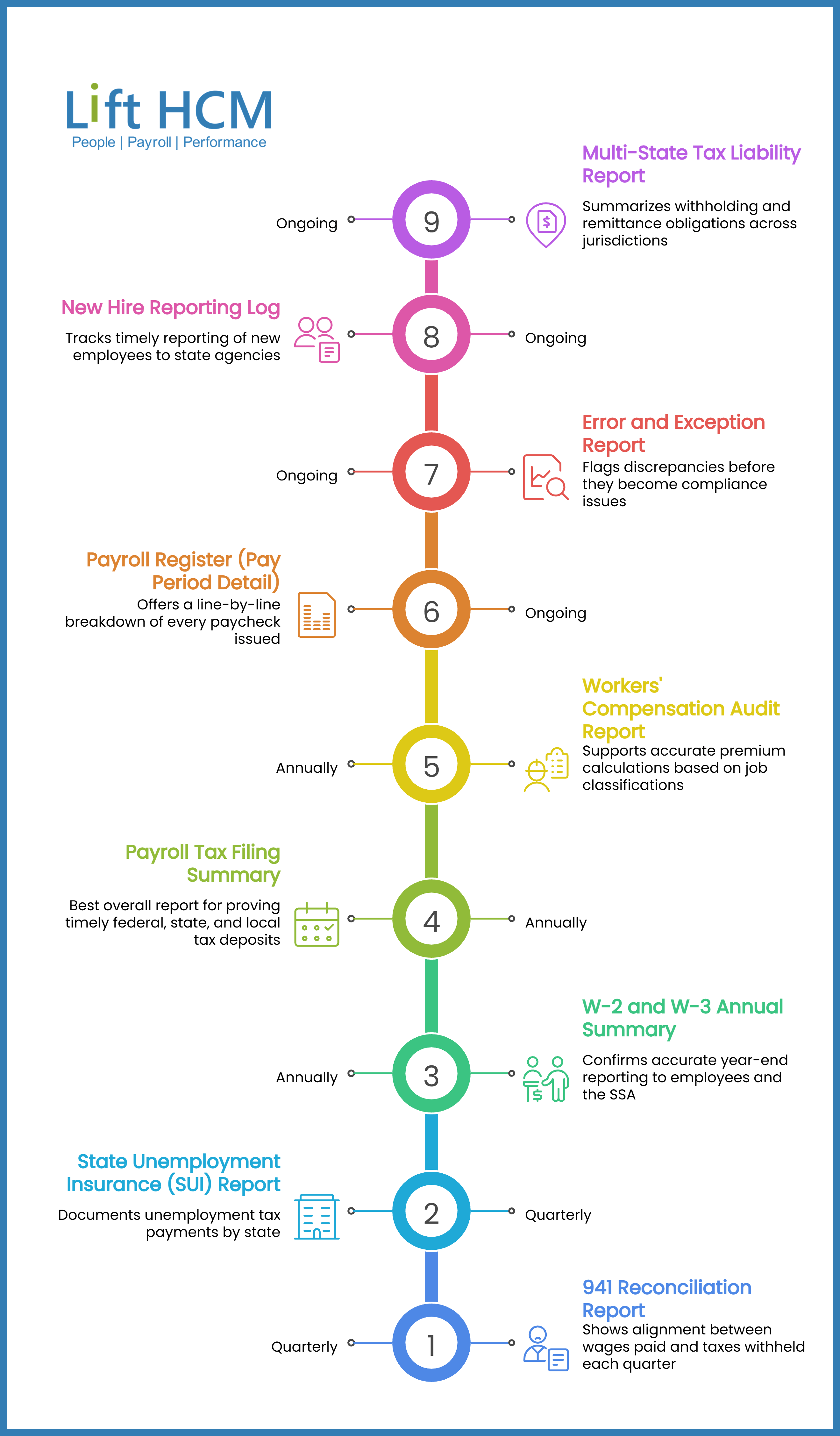
- Payroll Tax Filing Summary: The best overall report for proving timely federal, state, and local tax deposits
- Quarterly 941 Reconciliation Report: Shows alignment between wages paid and taxes withheld each quarter
- W-2 and W-3 Annual Summary: Confirms accurate year-end reporting to employees and the SSA
- State Unemployment Insurance (SUI) Report: Documents unemployment tax payments by state
- New Hire Reporting Log: Tracks timely reporting of new employees to state agencies
- Workers' Compensation Audit Report: Supports accurate premium calculations based on job classifications
- Payroll Register (Pay Period Detail): Offers a line-by-line breakdown of every paycheck issued
- Error and Exception Report: Flags discrepancies before they become compliance issues
- Multi-State Tax Liability Report: Summarizes withholding and remittance obligations across jurisdictions
Table of Contents
How We Chose The Best Payroll Reports For Audit Readiness
Auditors don't want to see your entire payroll system. They want specific documentation that proves you paid the right people, withheld the correct taxes, and filed everything on time. We built this list by focusing on reports that directly answer those questions.
- Answers auditor questions directly: Each report maps to a common compliance inquiry, so you're not scrambling to pull data from multiple places
- Shows federal, state, and local coverage: Compliance isn't just about the IRS. State unemployment, workers' comp, and local taxes all matter
- Tracks deadlines and filing dates: Late filings trigger penalties, so reports that show when deposits were made carry real weight
- Supports accurate employee records: Reports should tie back to individual employees, not just totals
- Flags problems before they grow: Error reports catch discrepancies early, reducing your exposure during an audit
- Works for multi-state employers: If you have employees in multiple states, your reports need to break down obligations by jurisdiction

The 9 Best Payroll And Tax Reports For Audit Readiness
1. Payroll Tax Filing Summary: Best Overall Report For Proving Compliance
Your Payroll Tax Filing Summary is the report auditors typically ask for first. It shows every federal, state, and local tax deposit you've made, along with the dates those deposits were submitted. When an auditor wants to verify that you've been meeting your obligations, this is where they start.
Lift HCM generates this report automatically from your payroll runs, so you don't have to compile deposit records manually. The report pulls deposit amounts, submission dates, and confirmation numbers into a single document. This means you can hand it over with confidence, knowing it reflects what was actually filed.
A strong filing summary also helps you spot patterns. If you notice deposits landing close to deadlines, or occasionally late, that's a signal to review your payroll calendar.
Payroll Tax Filing Summary features
- Federal deposit tracking: Shows 941 deposits with dates and amounts, giving you a clear record of FICA and income tax withholding payments
- State-by-state breakdown: Separates deposits by jurisdiction, so you can verify compliance in every state where you have employees
- Local tax visibility: Includes city and county withholding payments for jurisdictions that require them
- Confirmation numbers: Links each deposit to its payment confirmation, creating an audit trail that's easy to verify
- Deposit timing analysis: Flags deposits that landed close to or after deadlines, helping you address timing issues proactively
- Year-to-date totals: Aggregates deposits across the year, making it easy to reconcile against quarterly and annual returns
Payroll Tax Filing Summary Pros & Cons
✅ Pros:
- Creates a single source of truth for all tax deposits across federal, state, and local jurisdictions
- Reduces time spent gathering documentation when an audit request arrives
- Helps identify deposit timing patterns that could lead to penalties
⚠️ Cons:
- Accuracy depends on correct payroll system configuration for each jurisdiction
- May require manual review for employers with complex local tax situations
- Historical data quality varies if you've recently switched payroll providers
2. Quarterly 941 Reconciliation Report: Validates Wage And Tax Alignment
The IRS requires employers to file Form 941 quarterly, reporting wages paid and taxes withheld. Your Quarterly 941 Reconciliation Report compares your payroll data against what you filed, ensuring the numbers match. Discrepancies between your payroll register and your 941 are a common audit trigger.
This report breaks down gross wages, federal income tax withheld, and social security and Medicare taxes by quarter. When the totals align, you have documentation showing your filings were accurate. When they don't, you can identify the source of the variance before an auditor does.
Quarterly 941 Reconciliation Report Features
- Quarter-by-quarter comparison: Shows wages and withholdings for each quarter alongside your filed 941 amounts
- Variance identification: Highlights differences between payroll data and filed returns for quick investigation
- Social Security wage base tracking: Confirms withholding stopped at the annual wage limit for each employee
Quarterly 941 Reconciliation Report Pros & Cons
✅ Pros:
- Directly supports Form 941 accuracy, which is a primary audit focus
- Makes quarterly reconciliation a routine task rather than a year-end scramble
- Helps catch over- or under-withholding before W-2s are issued
⚠️ Cons:
- Requires consistent payroll categorization to generate accurate comparisons
- Adjustments made after filing may not automatically update the reconciliation
- Multi-entity employers may need separate reconciliations for each EIN
3. W-2 And W-3 Annual Summary: Confirms Year-End Reporting Accuracy
Your W-2s go to employees and the Social Security Administration. Your W-3 summarizes all W-2s for your business. The W-2 and W-3 Annual Summary report confirms these forms were generated correctly, with totals that match your payroll records for the year.
Auditors use this report to verify that what you reported to employees matches what you reported to the government. Discrepancies can lead to employee complaints, SSA notices, and additional scrutiny.
W-2 And W-3 Annual Summary Features
- Employee-level detail: Shows each employee's reported wages, withholdings, and benefit amounts
- W-3 total validation: Confirms the W-3 transmittal form ties back to individual W-2s
- Box-by-box breakdown: Details each W-2 box value, making it easy to explain specific amounts
W-2 And W-3 Annual Summary Pros & Cons
✅ Pros:
- Serves as a complete record of annual employee tax reporting
- Simplifies year-end reconciliation between payroll and W-2 data
- Helps answer employee questions about their W-2 amounts
⚠️ Cons:
- Corrections after filing require W-2c forms, which add administrative work
- Benefits reporting complexity can create discrepancies if not configured correctly
- Late hires or terminations sometimes cause timing issues with data accuracy
4. State Unemployment Insurance (SUI) Report: Documents Unemployment Tax Compliance
Every state has its own unemployment insurance program, and employers pay into it based on wages and experience ratings. The SUI Report documents your contributions to each state where you have employees, showing the wages subject to SUI tax and the amounts remitted.
State agencies audit SUI compliance separately from federal returns. This report gives you the documentation to respond quickly when they do.
State Unemployment Insurance Report Features
- State-by-state contributions: Shows SUI payments made to each state where you have employees
- Wage base tracking: Identifies when employees reach the state's taxable wage limit
- Experience rate documentation: Records the rate applied to your account for each state
State Unemployment Insurance Report Pros & Cons
✅ Pros:
- Supports quick response to state agency audits or rate inquiries
- Helps forecast SUI costs when hiring in new states
- Documents rate changes over time for financial planning
⚠️ Cons:
- Rate accuracy depends on timely updates from state agencies
- Multi-state employers may face complexity coordinating records across jurisdictions
- Voluntary contributions or rate protests require separate documentation
5. New Hire Reporting Log: Tracks State Reporting Deadlines
Federal and state law requires employers to report new hires, typically within 20 days. The New Hire Reporting Log documents when you reported each new employee to the appropriate state agency, along with the required information.
This report matters for child support enforcement and helps you demonstrate compliance with new hire reporting mandates.
New Hire Reporting Log Features
- Hire date vs. report date: Shows how quickly you reported each new employee after their start date
- State agency confirmation: Documents successful submission to state new hire databases
- Required data fields: Confirms all mandatory information was included in each report
New Hire Reporting Log Pros & Cons
✅ Pros:
- Documents compliance with federal and state new hire reporting requirements
- Helps identify delays in your onboarding process
- Supports response to child support enforcement inquiries
⚠️ Cons:
- Manual hiring processes can create gaps in reporting
- State deadlines vary, so tracking requires attention to jurisdiction-specific rules
- Rehires may require separate reporting depending on state requirements
6. Workers' Compensation Audit Report: Supports Accurate Premium Calculations
Workers' compensation insurers audit employer payroll records to verify premiums are based on actual wages by job classification. The Workers' Compensation Audit Report breaks down wages by classification code, making it easy to reconcile with your insurance carrier's records.
Inaccurate classification or unreported wages can lead to premium adjustments or penalties.
Workers' Compensation Audit Report Features
- Classification code breakdown: Groups wages by NCCI or state-specific classification codes
- Overtime wage separation: Shows straight-time versus overtime wages, as overtime is typically calculated differently for workers' comp
- Excluded wage identification: Flags wages that may be excluded from premium calculations under your policy
Workers' Compensation Audit Report Pros & Cons
✅ Pros:
- Speeds up the annual workers' comp audit process
- Reduces the risk of premium adjustments from wage misclassification
- Helps verify your carrier is using accurate data for your experience rating
⚠️ Cons:
- Classification accuracy requires proper job role coding at hire
- Employee role changes may require mid-year reclassification
- State-specific rules add complexity for multi-state employers
7. Payroll Register (Pay Period Detail): Line-By-Line Paycheck Documentation
The Payroll Register is the foundation of your payroll records. It shows every paycheck issued during a pay period, including gross wages, deductions, taxes withheld, and net pay. Auditors use this report to verify individual employee payments and trace specific transactions.
Lift HCM's payroll register links directly to time and attendance data, so you can trace any paycheck back to the hours that generated it.
Payroll Register Features
- Employee-by-employee detail: Lists each employee's earnings, deductions, and net pay for the period
- Deduction itemization: Shows every deduction by category—taxes, benefits, garnishments, and voluntary contributions
- Earnings code breakdown: Separates regular pay, overtime, bonuses, and other compensation types
Payroll Register Pros & Cons
✅ Pros:
- Serves as the primary audit trail for all payroll transactions
- Enables quick answers to employee questions about specific paychecks
- Supports reconciliation with bank statements and general ledger entries
⚠️ Cons:
- High volume of data can make it time-consuming to review without filtering
- Historical changes to earning codes may require additional documentation
- Off-cycle payments can create complexity in period-over-period comparisons
8. Error And Exception Report: Catches Discrepancies Before Auditors Do
The Error and Exception Report flags issues before you finalize payroll—missing timecards, employees paid below minimum wage, negative net pay, or withholdings that don't match employee elections. Running this report every pay period helps you catch problems early.
At Lift HCM, we configure exception reports based on your specific risk areas, so you see what matters most for your business.
Error And Exception Report Features
- Pre-payroll validation: Flags issues before payroll processes, giving you time to correct them
- Minimum wage compliance: Identifies employees whose calculated hourly rate falls below applicable minimums
- Missing data alerts: Highlights incomplete timecards, missing tax elections, or unsigned acknowledgments
Error And Exception Report Pros & Cons
✅ Pros:
- Prevents small errors from compounding into larger compliance issues
- Reduces the number of payroll corrections needed after processing
- Creates a documented history of issues identified and resolved
⚠️ Cons:
- Requires regular review to be effective—reports only help if someone acts on them
- False positives can create alert fatigue if thresholds aren't calibrated
- Complex pay structures may generate more exceptions to review
9. Multi-State Tax Liability Report: Summarizes Obligations Across Jurisdictions
If you have employees in multiple states, your payroll system needs to calculate and track withholding for each jurisdiction. The Multi-State Tax Liability Report shows your tax obligations by state, including income tax withholding, state unemployment, and any local taxes.
This report helps you verify that you're registered and remitting correctly in every state where you have employees.
Multi-State Tax Liability Report Features
- State-by-state liability summary: Shows total tax obligations for each state in a single view
- Local tax inclusion: Captures city and county taxes for jurisdictions with local withholding requirements
- Registration status tracking: Helps identify states where you may need to register or update accounts
Multi-State Tax Liability Report Pros & Cons
✅ Pros:
- Essential for multi-state employers managing complex tax obligations
- Helps identify registration gaps before they trigger agency notices
- Supports accurate budgeting for state-specific payroll tax costs
⚠️ Cons:
- Accuracy depends on correct work location assignments for each employee
- Reciprocity agreements between states add complexity to withholding decisions
- Employees who move mid-year may require manual adjustments
Comparison Table: Audit-Ready Payroll Reports
|
Report |
Primary Audit Use |
Covers Federal Taxes |
Covers State Taxes |
|
Lift HCM Payroll Tax Filing Summary |
Deposit verification |
✓ |
✓ |
|
Quarterly 941 Reconciliation |
Wage/tax alignment |
✓ |
✗ |
|
W-2 and W-3 Summary |
Year-end accuracy |
✓ |
✓ |
|
SUI Report |
Unemployment compliance |
✗ |
✓ |
|
New Hire Reporting Log |
Reporting timeliness |
✓ |
✓ |
|
Workers' Comp Audit Report |
Premium verification |
✗ |
✓ |
|
Payroll Register |
Transaction detail |
✓ |
✓ |
|
Error and Exception Report |
Issue documentation |
✓ |
✓ |
|
Multi-State Tax Liability |
Jurisdiction tracking |
✗ |
✓ |
👉 Takeaway: Lift HCM generates all nine reports from a single system, so your audit documentation stays consistent and connected to your actual payroll data.
What Makes A Payroll Report Audit-Ready?
Not every report qualifies as audit documentation. Auditors look for specific characteristics that demonstrate your records are reliable and complete. If your reports are missing key elements, they may raise more questions than they answer.
An audit-ready report includes clear date ranges, employee-level detail where appropriate, and totals that tie back to your filed returns. It should be generated directly from your payroll system, not manually compiled from multiple sources. Lift HCM builds these elements into every standard report, so you don't have to reconstruct audit trails after the fact.
Reports should also show who ran them and when. This metadata matters because auditors want to know your documentation wasn't created specifically for the audit. Regular reporting throughout the year demonstrates that compliance is part of your ongoing operations, not a last-minute effort.
How Often Should You Run Compliance Reports?
The right frequency depends on the report type and your business complexity. Some reports make sense every pay period, while others are quarterly or annual. The key is building a rhythm that catches issues early without overwhelming your team.
- Every pay period: Payroll register, error and exception report
- Monthly: Tax filing summary, multi-state liability report (for multi-state employers)
- Quarterly: 941 reconciliation, SUI report
- Annually: W-2/W-3 summary, workers' comp audit report, new hire reporting review
At Lift HCM, we help clients set up automated report schedules based on their specific compliance needs. This way, the reports you need are ready before you realize you need them.
FAQs About Audit-Ready Payroll And Tax Reports
What Payroll Records Do Auditors Typically Request?
Auditors usually request tax deposit records, quarterly 941 reconciliations, W-2 summaries, and payroll registers. Lift HCM generates all of these reports automatically, so you can respond to audit requests quickly and confidently.
How Long Should You Keep Payroll Records For Audit Purposes?
The IRS recommends keeping employment tax records for at least four years after filing the related return. State requirements vary, so keeping records for seven years covers most situations. Lift HCM stores your payroll data securely and makes historical reports accessible when you need them.
Can Payroll Software Help Prevent Audit Issues?
Payroll software with built-in compliance features helps prevent audit issues by automating tax calculations, tracking filing deadlines, and flagging errors before they compound. Lift HCM includes exception reporting that catches discrepancies every pay period, reducing your exposure during an audit.
What's The Difference Between A Payroll Register And A Tax Filing Summary?
A payroll register shows every paycheck issued during a pay period, including wages, deductions, and net pay. A tax filing summary shows the deposits you made to tax agencies and when they were submitted. Both are important for audits—the register documents what you paid employees, while the filing summary documents what you remitted to the government.
How Do Multi-State Employers Stay Audit-Ready?
Multi-state employers need reports that break down tax obligations by jurisdiction. Lift HCM tracks withholding, unemployment, and local taxes for each state where you have employees, generating reports that show your compliance status across all jurisdictions in a single view.
How To Stay Audit-Ready Before Problems Start
Staying audit-ready is rarely about scrambling for documents at the last minute. It comes from running the right payroll and tax reports consistently, reviewing them before small issues grow, and keeping your records organized throughout the year. When you have these nine reports ready to go, you are in a much stronger position to answer auditor questions clearly, verify compliance, and protect your business from avoidable penalties.
That is the real advantage of a well-built payroll process. You are not just checking a compliance box. You are creating a cleaner trail of documentation, reducing manual follow-up, and giving your team more confidence every time a question comes up.
If your current reporting process still depends on spreadsheets, disconnected systems, or too much manual work, it is worth taking a closer look now, before the next audit request lands. Lift HCM helps businesses bring payroll, tax reporting, time tracking, and HR administration into one connected system with proactive compliance help and responsive support from real people.
If you want to strengthen your audit readiness, start by reviewing which of these nine reports you already run consistently and where the gaps are. From there, the next step is simple: make those reports part of your regular payroll rhythm so you are ready long before an auditor asks for them.
Want to know if your payroll reporting process is truly audit-ready? Talk with Lift HCM about where gaps may exist and how to build a cleaner, more reliable compliance workflow before they turn into costly problems.

Topics:



.png?width=1536&height=1024&name=Create%20a%20background%20that%20reads%2c%20How%20Long%20to%20Keep%20P%20(1).png)