

Payroll automation sounds straightforward until you run your first multi-state pay cycle, miss a quarterly tax deposit deadline, or realize your time data doesn't match your payroll register. For growing businesses, these aren't hypotheticals. They're the exact moments when manual processes break down and compliance risk spikes.
At Lift HCM, we've helped dozens of businesses build and refine these workflows, and the patterns in this guide come directly from that experience. This guide covers every stage of building a payroll automation workflow that holds up under real operating conditions. You'll find step-by-step frameworks for eliminating manual entry errors, hitting federal and state tax filing deadlines, and creating compliance checkpoints that catch problems before they reach a paystub.
Key Takeaways
- Payroll automation reduces manual entry errors by replacing repetitive keystroke tasks with rule-based calculations and validations.
- Automated tax filing workflows help you meet IRS deposit schedules and avoid late-payment penalties on Form 941.
- Connecting time tracking to payroll eliminates the data gaps that cause overtime miscalculations and compliance exposure.
- Compliance checkpoints built into your automation catch misclassification, missing withholdings, and recordkeeping gaps early.
Table of Contents
What Is Payroll Automation and Why Does It Matter for Growing Businesses?
Payroll automation is the process of using software to handle pay calculations, tax withholdings, deductions, direct deposits, and reporting with minimal manual input. Instead of keying hours, rates, and tax codes into a spreadsheet, an automated workflow pulls verified time data, applies current tax tables, and calculates net pay according to your configured rules.
For a 10-person company running biweekly payroll, manual entry might take a couple of hours and produce an occasional rounding error. Scale that to 50 or 100 employees across two states, and those same manual steps create dozens of failure points per cycle. Each failure point is a potential compliance issue, a delayed paycheck, or a tax penalty.
That's exactly where automation earns its value. It isn't about eliminating the payroll function. It's about removing the repetitive, error-prone steps so your team can focus on exceptions, approvals, and compliance oversight.
How Manual Payroll Processes Create Tax Filing Errors
Manual payroll processes introduce errors in predictable places. Understanding where these errors originate helps you build an automation workflow that targets the right gaps.
Data Entry Mistakes in Hours and Earnings
When hours are keyed from paper timesheets or emailed spreadsheets, transposition errors are common. A single mistyped digit on an hourly employee's time record can ripple through gross pay, tax withholdings, and employer-side contributions. Multiply that across a full pay period, and the cumulative effect can throw off your quarterly 941 filing.
Incorrect Tax Withholding Calculations
Federal income tax, Social Security, Medicare, and state-level withholdings each follow different rate structures and thresholds. Manually applying these rates (especially when an employee crosses a wage base limit mid-year) invites miscalculation. The IRS requires employers to deposit withheld taxes on either a monthly or semiweekly schedule, depending on your total tax liability. Miss the threshold and you're on the wrong schedule, which can trigger a failure-to-deposit penalty under IRS deposit rules.
Missed Deadlines and Late Filings
IRS penalties for late payroll tax deposits range from 2% (1-5 days late) to 15% for amounts still unpaid more than 10 days after a final notice. When you're tracking deadlines manually, a single calendar oversight can cost your business a meaningful percentage of the taxes owed for that period.
Core Components of a Payroll Automation Workflow
A payroll automation workflow is a connected sequence of systems and rules that move data from time capture through pay calculation to tax filing, with validation checks at every stage. Here are the components that matter most.
Automated Time Capture and Validation
Your time tracking system is the starting point. Automated time capture uses digital clock-in/clock-out records, GPS-verified mobile punches, or biometric devices to record employee hours directly into the payroll system. This eliminates the manual handoff between a timesheet and a payroll register.
Validation rules flag anomalies before they enter the pay cycle. Examples include shifts exceeding a configurable hour threshold, missed punches, and duplicate entries. Catching these at the source prevents downstream calculation errors.
Pay Calculation Engine with Current Tax Tables
The pay calculation engine applies your configured pay rules (hourly rates, salary proration, shift differentials, overtime rules) and current federal, state, and local tax tables. A properly maintained automation engine updates these tables as tax agencies publish rate changes, so you're never applying an outdated withholding percentage.
This is where many businesses first notice the difference between manual and automated payroll. The engine handles garnishments, pre-tax and post-tax deductions, employer-match contributions, and imputed income in a single calculation pass. Doing this by hand reliably for 50+ employees across multiple jurisdictions is where errors compound.
Direct Deposit and Pay Distribution
Automated direct deposit workflows send pay to employee bank accounts on your scheduled pay date. The system generates ACH files, transmits them to your bank before the required cutoff time, and logs the transaction for reconciliation. Employees can also access pay stubs and tax documents through a self-service portal, which reduces HR's administrative workload on pay day.
Tax Filing and Deposit Automation
Automated tax filing handles the calculation, preparation, and submission of your payroll tax deposits and returns. This includes federal deposits (Form 941 quarterly, Form 940 annually), state withholding deposits, and local tax obligations where applicable.
The automation calculates your deposit schedule (monthly or semiweekly) based on your lookback period liability, generates the correct deposit amounts, and initiates electronic payments through EFTPS or your provider's filing system. At Lift HCM, our Payroll & Tax Management service layers compliance monitoring on top of this automation, helping you stay current with changing deposit schedules and filing requirements.
Step-by-Step: How to Build a Payroll Automation Workflow
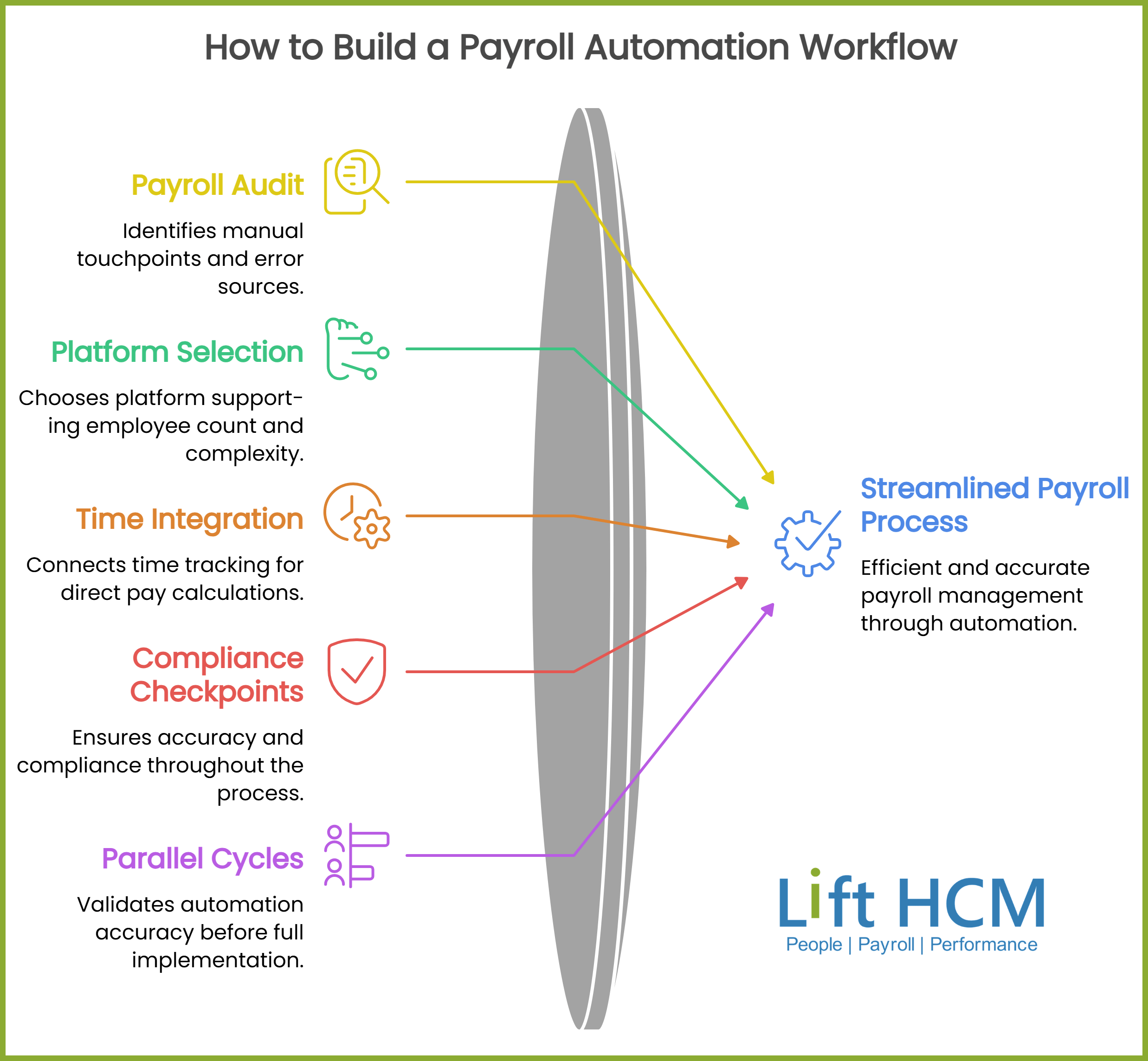
Building a payroll automation workflow isn't a single-afternoon project. It's a structured rollout that works through five stages. Here's a practical sequence based on what we've seen work across dozens of implementations.
Step 1: Audit Your Current Payroll Process
Start by mapping every manual touchpoint in your current pay cycle. Document who enters time data, how it reaches payroll, where tax calculations happen, and how deposits and filings get submitted. Track the time each step takes and identify where errors have occurred in the past 6-12 months.
This audit gives you a baseline. You can't measure the impact of automation without knowing exactly how long your current process takes and where it breaks.
Step 2: Select and Configure Your Payroll Platform
Choose a payroll platform that supports your current employee count, state presence, and pay complexity. Key capabilities to evaluate include multi-state tax engine support, configurable pay rules, integrated time tracking, direct deposit processing, and automated tax filing.
Configuration is where most implementations slow down. You'll need to set up your pay groups, earning codes, deduction types, tax jurisdictions, and approval workflows before running your first automated cycle. Rushing this step creates problems that surface weeks later in incorrect withholdings or misapplied deductions.
Step 3: Integrate Time and Attendance Data
Connect your time tracking system to the payroll platform so that approved hours flow directly into pay calculations. This integration eliminates the manual re-entry step that causes the majority of gross pay errors in growing businesses.
Lift HCM's time and attendance tools feed verified hours directly into payroll, reducing the data gap that leads to overtime miscalculations and compliance exposure. Make sure your integration includes validation rules that flag unapproved overtime, missed punches, and schedule conflicts before the pay cycle runs.
Step 4: Build Compliance Checkpoints into the Workflow
Compliance checkpoints are automated or semi-automated verification steps that run at defined points in your pay cycle. These catch issues that would otherwise reach your tax filing or employee paystubs unchecked.
Examples of checkpoints to build into your workflow:
- Pre-payroll review: flag new hires missing W-4 or state withholding forms
- Calculation review: compare current-period gross pay to prior-period averages and flag variances exceeding a threshold (for example, 15% or more)
- Tax deposit verification: confirm deposit amounts match calculated liabilities before transmission
- Post-payroll audit: reconcile total payroll expense to your general ledger before closing the period
Step 5: Run Parallel Cycles and Go Live
Before fully switching to the automated workflow, run at least two parallel payroll cycles. Process payroll through both your old system and the new automation, then compare results line by line. Discrepancies reveal configuration issues you can fix before going live.
Once you've confirmed accuracy across parallel cycles, cut over to the automated system as your primary payroll process. Keep your old records accessible for at least one quarter as a reference.
How Payroll Automation Improves Tax Filing Accuracy
Tax filing accuracy depends on getting three things right: correct withholding calculations, on-time deposits, and accurate quarterly and annual returns. Here's how automation addresses each one.
Real-Time Tax Table Updates
Federal and state tax agencies update withholding rates, wage base limits, and filing thresholds periodically. An automated payroll system applies these updates as they're published, so your withholdings reflect current rates. This matters most when state-level changes take effect mid-year and your manual process hasn't caught the update.
Automated Deposit Scheduling
Your deposit schedule (monthly or semiweekly) is determined by your lookback period tax liability. An automated system tracks your cumulative liability, determines the correct schedule, and initiates deposits in time to meet the IRS deadline. This removes the guesswork around deposit timing that leads to failure-to-deposit penalties.
Quarterly and Year-End Return Preparation
Form 941, Form 940, W-2s, and 1099s require accurate aggregation of quarterly and annual wage and tax data. When each pay cycle is calculated and stored by an automated system, generating these returns is a matter of pulling verified data rather than reconstructing it from spreadsheets and bank statements.
For businesses filing in multiple states, automation also tracks state unemployment insurance (SUI) rates, state-specific withholding returns, and local tax obligations that would otherwise require separate manual calculations for each jurisdiction.
Payroll Compliance Checkpoints Every Growing Business Needs
Compliance in payroll isn't a single event. It's a series of checkpoints embedded into your ongoing operations. Here are the ones that matter most as your business scales.
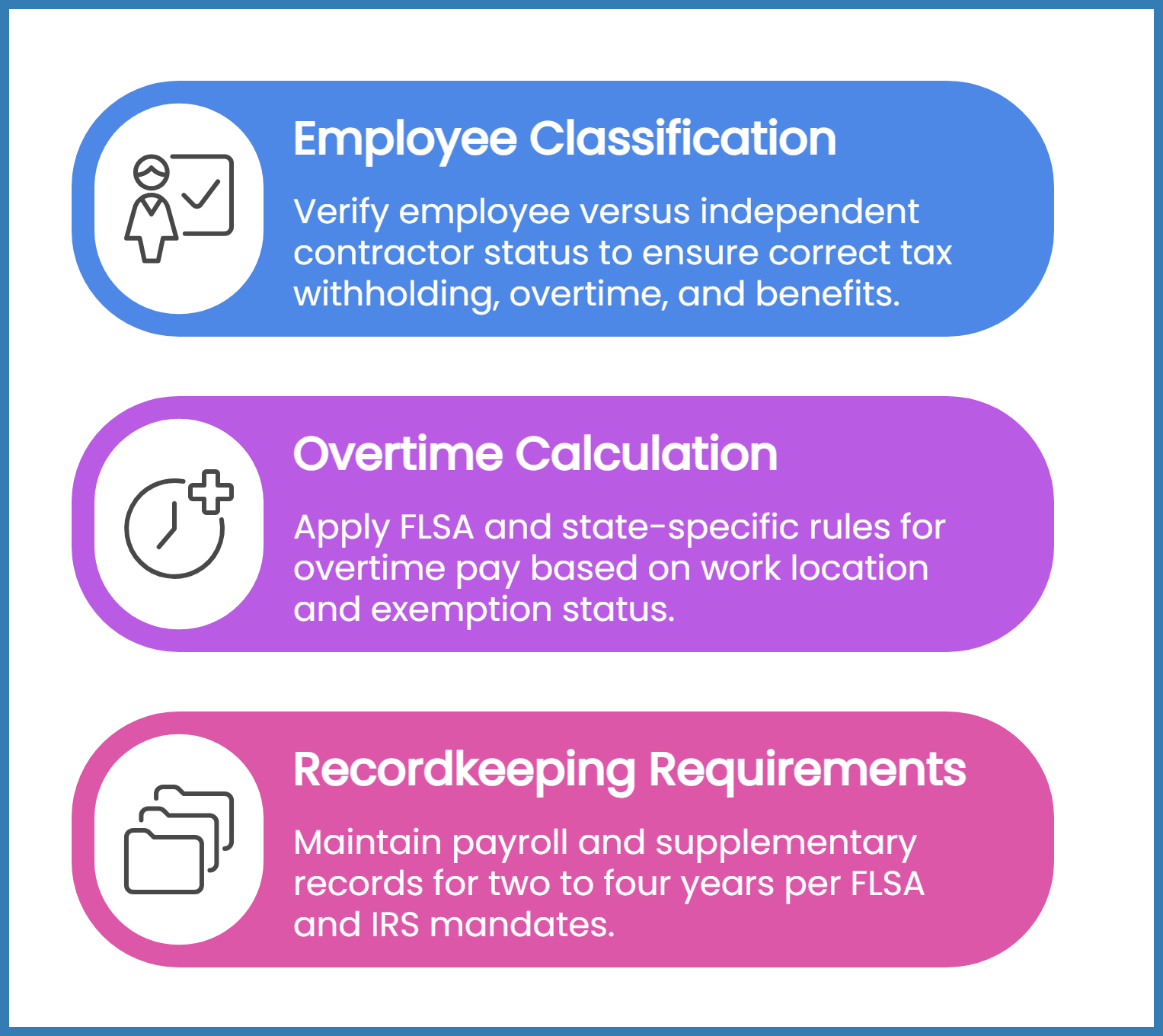
Employee Classification Verification
Misclassifying an employee as an independent contractor (or vice versa) changes your tax withholding obligations, overtime requirements, and benefits eligibility. The IRS uses a behavioral, financial, and relationship test to determine classification. Your automation workflow should flag new hires and role changes for classification review before the first pay cycle runs.
Overtime Calculation Compliance
Under the Fair Labor Standards Act (FLSA), non-exempt employees must receive overtime pay at 1.5 times their regular rate for hours worked beyond 40 in a workweek. Some states (like California) require daily overtime for hours exceeding 8 in a single day. Your payroll automation must apply the correct overtime rules based on each employee's work location and exemption status.
Lift HCM's automated payroll platform applies jurisdiction-specific overtime rules automatically, removing the need for your team to track which state requires daily versus weekly calculations.
Recordkeeping Requirements Under Federal Law
The FLSA requires employers to maintain payroll records for at least three years and supplementary records (timecards, work schedules, wage rate tables) for at least two years. The IRS requires employment tax records to be available for at least four years after the due date of the return. According to the U.S. Department of Labor Fact Sheet #21, employers must keep records that include hours worked each day, total hours for the workweek, regular rate of pay, and total overtime compensation.
An automated payroll system stores these records digitally and makes them accessible for audits and reporting on demand. This replaces the filing cabinets and spreadsheet archives that create gaps when an agency requests documentation.
When to Move from Basic Payroll Software to Integrated HCM
Basic payroll software handles pay calculation and direct deposit. That's often enough for a 5-person company with a single location. As your business adds employees, states, benefit plans, and compliance obligations, you'll hit inflection points where standalone payroll no longer covers what you need.
Signs You've Outgrown Standalone Payroll
If you're exporting payroll data into a separate HR system, manually reconciling time records, or tracking benefits enrollment in a spreadsheet, you've outgrown standalone payroll. These manual bridges between disconnected systems are where errors enter and compliance gaps form.
What an Integrated HCM Platform Adds
An integrated human capital management (HCM) platform connects payroll, reporting, time tracking, benefits administration, and HR records in a single system. Data entered once flows through every connected function, which eliminates the double-entry and reconciliation work that consumes your team's time.
Lift HCM's platform runs payroll, time, HR, and benefits on one unified system, so changes to an employee's status, location, or pay rate update automatically across all connected workflows. This is the difference between a payroll tool and a payroll workflow that stays accurate as your business grows.
Common Payroll Automation Mistakes to Avoid
Even with a well-configured system, there are patterns that trip up growing businesses during and after implementation. Here's what to watch for.
Skipping the Parallel Run
Going live without running at least two parallel payroll cycles is the most common implementation mistake. Parallel runs catch configuration errors (wrong tax jurisdiction, missing deduction codes, incorrect pay schedules) before they affect real paychecks. Skipping this step means your employees are the ones who discover the errors.
Ignoring State-Specific Rules After Setup
State tax laws, unemployment rates, and wage requirements change regularly. Your automation handles rate table updates, but state-specific rules around new-hire reporting, paid leave, and wage theft notification vary and sometimes require manual configuration changes. Assign someone on your team to review state-level updates quarterly.
Not Reviewing Exception Reports
Automated payroll systems generate exception reports that flag anomalies in each pay cycle. If no one reviews these reports before approving the run, automation only speeds up the delivery of errors. Treat exception reports as a required approval step, not an optional output.
How to Evaluate Payroll Automation for Your Business
Choosing the right payroll automation approach depends on your business characteristics, not on a feature checklist. Here's a framework based on what we've seen work across different company profiles.
If You Have Fewer Than 20 Employees in One State
A straightforward payroll automation tool with built-in tax filing covers your core needs. Focus on accuracy, deposit scheduling, and year-end return preparation. At this stage, your primary risk is manual entry errors and missed filing deadlines.
If You Have 20-100 Employees Across Multiple States
Multi-state payroll introduces jurisdiction-specific withholding rates, SUI rates, and reciprocity agreements. You'll need a platform with a multi-state tax engine, integrated data flows between time tracking and payroll, and compliance monitoring that flags when a state changes its rules. This is the stage where an integrated HCM platform typically becomes the more practical choice over standalone payroll software.
If You're Growing Rapidly or Operating in Compliance-Heavy Industries
Hospitality, construction, healthcare, and education each carry industry-specific compliance requirements around overtime, tip reporting, prevailing wages, or credentialing. At Lift HCM, we work with partners in these exact industries and build automation workflows that account for the regulatory layers standard payroll software doesn't address.
FAQs About Payroll Automation
What is payroll automation?
Payroll automation uses software to calculate pay, withhold taxes, distribute wages, and file returns with minimal manual input. It replaces repetitive keystroke tasks with rule-based calculations.
This frees your payroll team to focus on exceptions, approvals, and compliance oversight rather than data entry.
How does payroll automation reduce tax filing errors?
Automated systems apply current tax tables, track deposit schedules, and aggregate wage data accurately for quarterly and annual returns. Lift HCM's Payroll & Tax Management service monitors changing deposit requirements so you don't miss filing deadlines or apply outdated rates.
When should a growing business switch to automated payroll?
Switch when you're spending more time on manual data entry and reconciliation than on reviewing results. For most businesses, the inflection point arrives around 15-20 employees or the moment you hire in a second state.
Can payroll automation handle multi-state tax compliance?
Yes. A properly configured platform applies jurisdiction-specific withholding rates, SUI rates, and reciprocity agreements for each employee's work location. Lift HCM's payroll platform manages multi-state compliance automatically, so you don't have to track rule changes across every jurisdiction manually.
What compliance checkpoints should be part of a payroll workflow?
Your workflow should include pre-payroll form verification, gross pay variance flagging, tax deposit reconciliation, and post-payroll general ledger matching. These checkpoints catch misclassification, missing withholdings, and calculation errors before they reach employee paystubs.
How does Lift HCM support payroll automation for growing businesses?
Lift HCM connects payroll, time tracking, HR, and benefits on one platform. Verified time data flows directly into pay calculations, tax tables update automatically, and compliance monitoring flags issues before they become penalties. Your dedicated support team helps configure and maintain your automation as your business grows.
Building a Payroll Automation Workflow That Holds Up
Payroll automation isn't a one-time software purchase. It's a workflow you build, test, and refine as your business adds employees, states, and complexity. The businesses that get the most value from automation are the ones that treat it as an ongoing operational discipline, not a set-and-forget installation.
The core of a reliable payroll workflow comes down to three things: clean time data feeding directly into your pay calculations, current tax tables applied automatically at every cycle, and compliance checkpoints that catch errors before they reach a paystub or a tax return.
If you're evaluating your current process or building a new one from scratch, Lift HCM's team can walk through your specific setup, identify where the gaps are, and show you what an integrated payroll and HR workflow looks like for your business. Talk to our team to get a clear picture of where your payroll process stands today and where it needs to go.

Topics:



.png?width=1536&height=1024&name=Create%20a%20background%20that%20reads%2c%20How%20Long%20to%20Keep%20P%20(1).png)