

Have you ever worried if your team is truly keeping up with the latest employment verification rules? Are you unsure how the new Form I-9 and E-Verify updates for 2026 will impact your hiring and onboarding process?
At Lift HCM, we understand how overwhelming this confusion feels. We know that when compliance obligations keep shifting, it puts enormous pressure on HR managers and business owners. That’s why we’re here to translate the complex rules into simple, actionable steps. By the end of this article, you’ll walk away with:
- A clear explanation of the key Form I-9 and E-Verify updates relevant to 2026.
- Insight into why these changes matter for your operational efficiency and compliance risk.
- Common mistakes to avoid and practical actions you can take now.
Table of Contents
- What Are the Latest Form I-9 and E-Verify Updates?
- Why the 2026 Form I-9 and E-Verify Changes Matter for Employer Risk
- Form I-9 and E-Verify Mistakes: Common Pitfalls to Avoid
- Your Action Plan for Form I-9 and E-Verify Compliance
- Frequently Asked Questions (Q&A)
- Your Next Step Toward Easier Compliance
What Are the Latest Form I-9 and E-Verify Updates?
Form I-9 is the federal document every U.S. employer must complete for new hires to verify their identity and work authorization. The E-Verify system is an electronic program (mandatory for some, voluntary for others) that checks the Form I-9 details against government databases.
The rules for 2026 haven't dramatically changed the core process, but the updates are meaningful tweaks that demand immediate attention from HR and payroll leaders.
Key Updates for 2026
- New Form Edition: A revised edition of Form I-9 (edition date 01/20/25, expiration date 05/31/2027) is now available. Multiple editions remain valid until their respective expiration dates, which means employers must manage version control closely.
- Terminology Change: A key change is the new name for the fourth checkbox in Section 1: It has been updated from “A noncitizen authorized to work” to “An alien authorized to work.” This language aligns the form with U.S. statute.
- List B Document Revisions: The instructions for the Lists of Acceptable Documents have updated descriptions for two List B documents, including replacing the word “gender” with “sex”.
- E-Verify Alignment: Since April 3, 2025, the citizenship status selection in the E-Verify system was updated to match the new language (“An alien authorized to work”).
- New Monitoring Requirement: The E-Verify “Status Change Report” helps identify if an employee’s Employment Authorization Document (EAD) has since been revoked. This places a continuous monitoring and verification responsibility on employers.
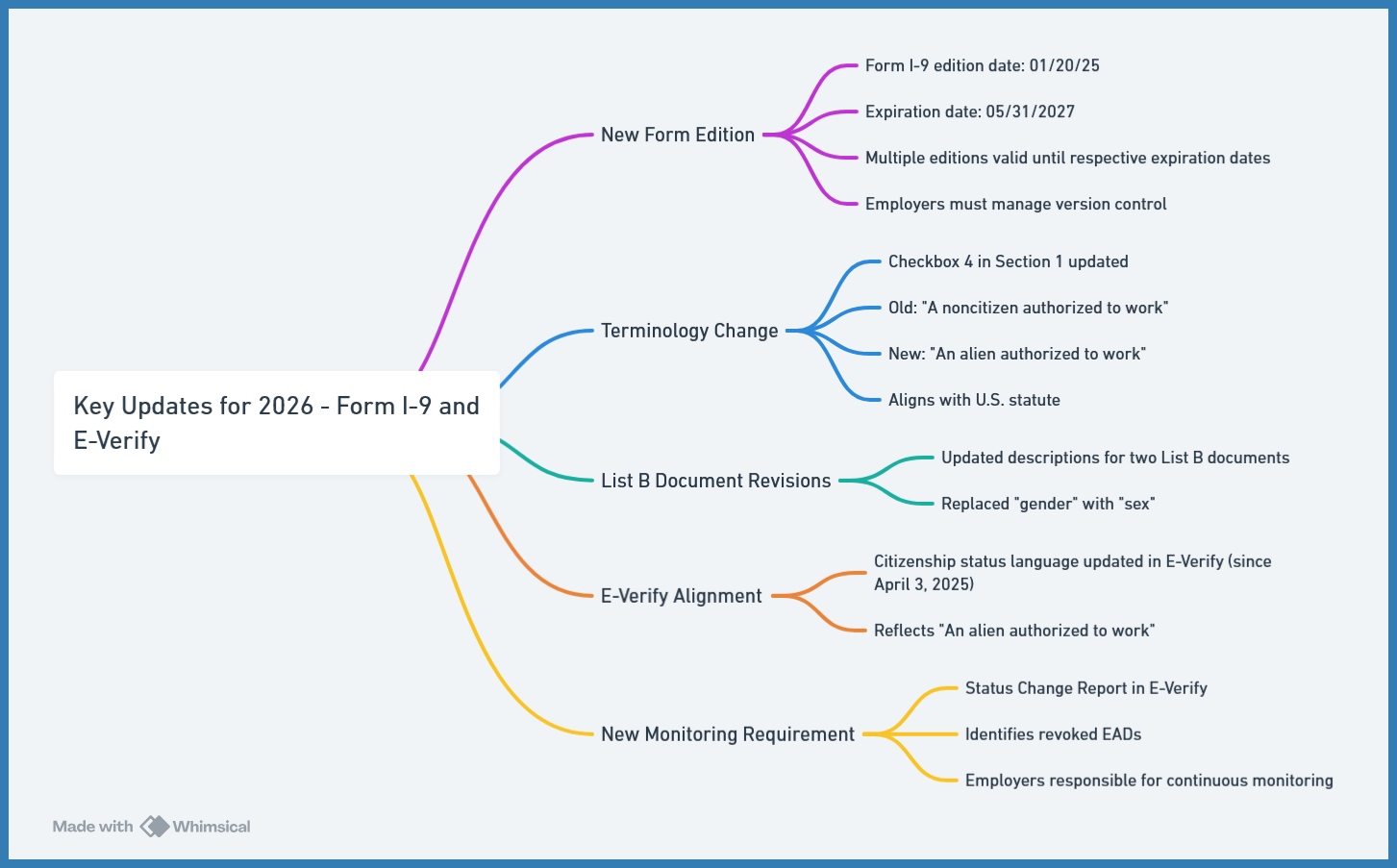
In short: Staying compliant for 2026 means paying close attention to these terminology changes, ensuring your systems support the correct form editions, and updating your internal processes accordingly.
Why the 2026 Form I-9 and E-Verify Changes Matter for Employer Risk
These updates might seem minor, but the consequences can be serious if overlooked. As a business leader, you need to minimize risk, reduce delays, and ensure your payroll is always running smoothly.
Impact on Hiring, Onboarding, and Compliance Risk
- System Mismatch and Delays: HR teams may get confused if older I-9 forms are used, or if E-Verify selections don't match what the employee wrote. If an employee uses "A noncitizen authorized to work" on an old form, but your system submits “An alien authorized to work” to E-Verify, your technology must correctly handle the difference.
- Increased Audit Risk and Penalties: Failing to use the right form version or missing the new continuous monitoring steps for revoked EADs can significantly increase the risk of audits or financial penalties. For example, a single, systemic I-9 paperwork error can cost an employer between $288 and $2,861 per form, increasing exponentially if the errors are widespread.
- Remote/Hybrid Workforce Compliance: The integrity of your I-9 and E-Verify process matters more than ever. Verification is no longer just a one-time check, especially with the permanent remote verification rules for E-Verify users.
- Clean Audits Equal Peace of Mind: Tidy I-9 and E-Verify processes mean fewer headaches later. When you bring payroll and Human Capital Management (HCM) workflows together—like with our platform—you can easily coordinate hiring, verification, and payroll setup without manual mistakes.
Form I-9 and E-Verify Mistakes: Common Pitfalls to Avoid
You are not alone if the shifting details have tripped you up. Many employers make the same missteps. Recognizing these common pitfalls is the first step toward fixing your system.
- Using the wrong form edition: Employers must keep track of which older Form I-9 editions they are using and when those forms finally expire. While older editions remain valid until their expiration, it's easier to standardize on the newest one.
- Mismatched terminology in systems: If your HR onboarding portal or E-Verify interface uses the old term, but the E-Verify system expects the new one, errors or confusion can arise. Your electronic provider must manage this difference automatically.
- Treating E-Verify as a one-time event: Many assume that once a case is created, they are done. But with the new “Status Change Report” requirement, you must actively monitor for revoked EADs and re-verify when necessary.
- Assuming remote hires relieve verification duties: Even if you hire remotely, the I-9 rules still apply. Verification must be handled either in person or using the DHS-authorized alternative procedure.
- Delayed cleanup or audits: Waiting for a government audit to review your I-9s is risky. Minor errors now can quickly lead to bigger, more costly penalties later on.
Your Action Plan for Form I-9 and E-Verify Compliance
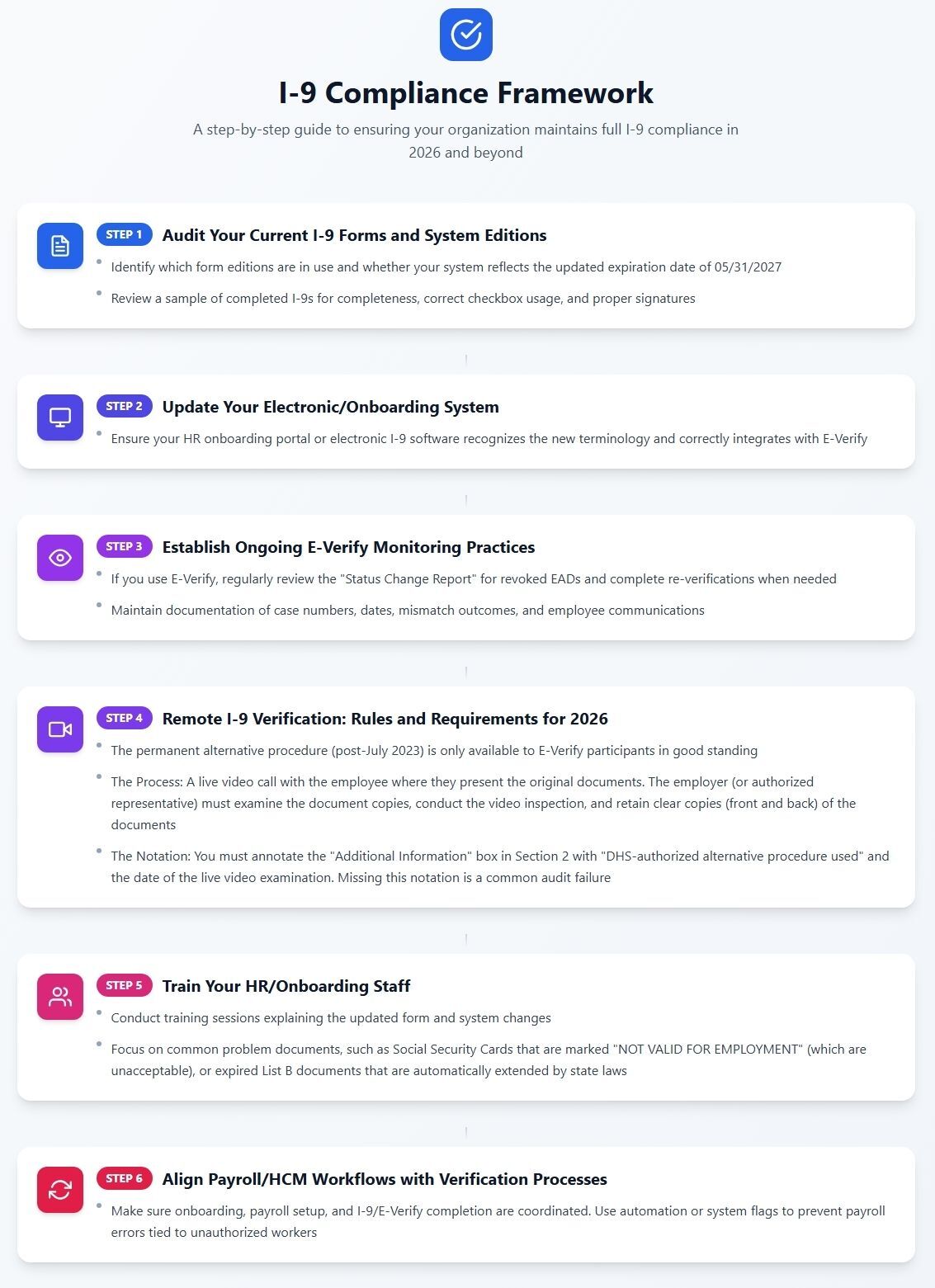
Here’s a practical, step-by-step framework you can apply now to align your verification processes with the latest rules.
Deep Dive: The Shift to Continuous Monitoring
The introduction of the Status Change Report officially signals a shift: Form I-9 compliance is no longer a one-time transactional event. It requires continuous monitoring throughout the employee's tenure, especially for employees whose work authorization is tied to a specific document, such as an EAD.
A revoked EAD—which can happen if a Temporary Protected Status (TPS) designation ends or a nonimmigrant visa status is terminated—requires immediate employer action. Ignoring the report or failing to re-verify constitutes a violation and exposes your organization to severe penalties for knowingly employing an unauthorized worker.
Step-by-Step Framework
Following these six steps ensures your organization maintains I-9 compliance and avoids costly penalties!
Choosing the right verification and onboarding solution is critical for risk reduction. Here’s a checklist of features you should evaluate—and how our solutions measure up:
|
Feature to Evaluate |
Why It Matters for 2026 Compliance |
How Lift HCM Helps |
|
Form Edition Management |
Ensures the correct Form I-9 edition is always used and automatically tracks expiration dates. |
Our electronic I-9 system deploys the newest form edition immediately and manages older versions compliantly. |
|
Terminology & System Updates |
The onboarding system must properly reflect new statutory language, like “An alien authorized to work.” |
Our platform handles the cross-reference between old form language and new E-Verify selections automatically. |
|
Continuous Monitoring/Alerts |
Ability to track E-Verify “Status Change Report” alerts, revoked EADs, and trigger re-verification workflows. |
Provides automated alerts and workflow flags to ensure the new continuous monitoring requirement is met on time. |
|
Audit Trail + Corrections |
Provides a legally defensible audit trail and forces proper correction methods (strike-through, initial, date). |
Our system prevents backdating and forces the correct, auditable correction method for both employee (Section 1) and employer (Section 2) errors. |
|
Remote/Hybrid Support |
Must comply with the DHS-authorized alternative procedure for remote hires. |
Supports compliant remote verification procedures with built-in tools, guidance, and required notations. |
|
Payroll/HCM Integration |
Ties onboarding verification directly to payroll to prevent errors and delays. |
Our unified platform ensures an employee cannot be paid until the I-9 and E-Verify processes are fully completed. |
Frequently Asked Questions (Q&A)
Q: What is the single biggest Form I-9 mistake that leads to fines?
A: The most common and costly mistake is late completion of Section 2. You must verify the employee's documents and complete Section 2 within three business days of the employee's start date. This is non-negotiable, and late forms are immediately cited as paperwork violations during an audit.
Q: Can I use the permanent remote verification option if my company is not enrolled in E-Verify?
A: No. The DHS-authorized alternative procedure for remote I-9 verification is a privilege reserved exclusively for employers who are participants in E-Verify and are in good standing. If you are not enrolled in E-Verify, you must use a physical, in-person inspection method for all I-9 documents.
Q: If an employee makes an error in Section 1, can I correct it for them?
A: No, you cannot. Errors in Section 1 are the employee's responsibility. As an employer, you must ask the employee to make the correction themselves by drawing a single line through the incorrect information, writing the correct information, and initialing and dating the change. Never use white-out or obscure the original text.
Q: What documents should I accept from an employee whose EAD (work card) has expired?
A: When re-verifying, you must allow the employee to choose any document from List A or List C. You may not require a specific document, such as a new DHS card. For example, if they present an unexpired, unrestricted Social Security Card (List C), you must accept it, even if their previous List A document (the EAD) has expired.
Q: Can I ask an employee to show me a specific document, like their passport?
A: No. Requiring a specific document is a violation of anti-discrimination rules. You must present the entire List of Acceptable Documents (List A, B, and C) and allow the employee to choose which document(s) they wish to present, as long as the choice is on the list.
Your Next Step Toward Easier Compliance
You don’t have to guess your way through Form I-9 and E-Verify compliance in 2026.
Remember: Using an integrated HCM solution is the only way to effectively monitor the new E-Verify Status Change Reports and keep your remote verification processes audit-ready, minimizing your exposure to multi-thousand-dollar fines.
At Lift HCM, we offer the integrated platform and expert support to turn complex compliance into a simple, automated workflow. Explore our solutions today!

Topics:






.png?width=1536&height=1024&name=Create%20a%20background%20that%20reads%2c%20How%20Long%20to%20Keep%20P%20(1).png)