
Most businesses shop for payroll the way they would shop for any other software. They compare features, compare prices, watch a few demonstrations, and pick a winner.
That approach can work until something goes wrong. A filing deadline slips. An employee's check is incorrect. A new hire in another state changes the company's tax obligations. Suddenly, the most important feature is not on the dashboard. It is the person responsible for helping resolve the problem.
At Lift HCM, we have helped hundreds of growing businesses navigate payroll technology, implementation, tax filing, and ongoing support. That experience has shown us that choosing payroll is not simply a software decision. It is also a decision about responsibilities, service, communication, and trust.
This guide explains how to choose a payroll provider by evaluating the technology and the team behind it. You will learn what to ask about tax filing, support, implementation, security, scalability, and total cost before signing an agreement.
Quick Answer: How Do You Choose a Payroll Provider?
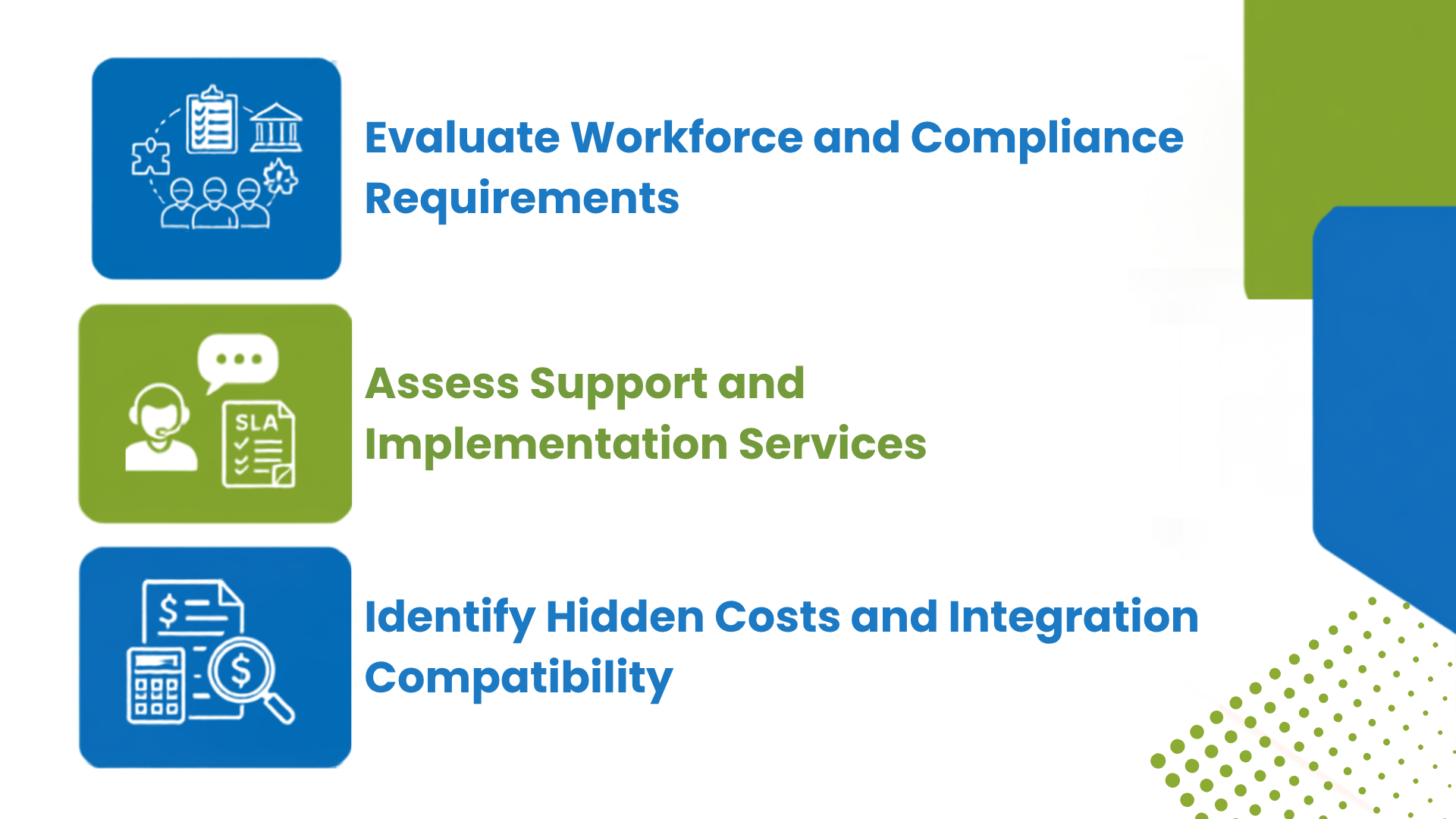
📊 Evaluate Workforce and Compliance Requirements
- Define your worker classifications (W-2 employees vs. 1099 contractors, hourly vs. salaried staff).
- Determine tax filing requirements across multi-state or local jurisdictions.
- Verify automated error detection features and compliance guarantees.
📋 Assess Support and Implementation Services
- Evaluate whether support is provided via self-service tools or dedicated account management.
- Confirm onboarding schedules and available data migration support.
- Test response times for live chat and urgent phone support channels.
⚠️ Identify Hidden Costs and Integration Compatibility
- Calculate total expenditures, including base subscription rates, per-employee fees, and year-end filing costs.
- Ensure seamless bi-directional synchronization with existing accounting and time-tracking systems.
- Verify platform scalability to support future headcount growth and geographic expansion.
Table of Contents
What Should You Look for Beyond Payroll Software?
Look for a provider that starts by learning how your business works, not by walking you straight through a product demo. Payroll requirements change based on workforce size, locations, pay structures, industry practices, and growth plans. A system that works for a 25-person professional services company may not fit a restaurant group with tipped employees working across several locations.
Before comparing providers, document the characteristics that make your payroll simple or complex:
- Current headcount and expected growth over the next one to three years
- States and local jurisdictions where employees work
- Hourly, salaried, commissioned, tipped, or seasonal employees
- Multiple pay rates, shift differentials, bonuses, or commissions
- Weekly, biweekly, semimonthly, or multiple pay schedules
- Timekeeping, accounting, benefits, retirement, and point-of-sale integrations
- Internal HR, payroll, finance, and IT resources
Growth plans deserve particular attention. SHRM's guidance on selecting a small-business HR system recommends looking beyond today's requirements and considering whether the technology will continue to fit several years into the future.
A provider that asks detailed questions about your workforce is giving you an early preview of its service approach. If the conversation never moves past screenshots and pricing tiers, ask how your account will be supported after the sales process ends.
Does the Technology Actually Simplify Payroll?
The right technology simplifies payroll by reducing repetitive work, improving visibility, and making routine tasks easier for administrators and employees alike. A long feature list doesn't automatically produce those results. What matters is whether the system handles your actual workflows without manual workarounds.
Ask to see the following functions during the demo:
- Entering and approving employee hours
- Previewing payroll before it is finalized
- Correcting an employee's pay
- Processing an off-cycle or bonus payroll
- Adding a new employee or work location
- Running labor-cost and tax-liability reports
- Exporting payroll information for accounting
- Accessing pay stubs, tax forms, and time-off balances through employee self-service
Do not limit the demonstration to the provider's prepared script. Give the salesperson two or three common scenarios from your organization and ask to see how the system handles them from beginning to end. SHRM's technology-selection guidance similarly recommends testing software against the buyer's own use cases instead of accepting a stock demonstration.
Integrations also deserve a close look. Ask whether connections to your accounting, timekeeping, benefits, retirement, or point-of-sale systems are native, file-based, or custom. Confirm who builds and maintains each connection and whether integration support carries a separate fee. You can learn more about connecting payroll, HR, and finance data on Lift HCM's HR and payroll integrations page.
Who Handles Payroll Taxes and Compliance Support?
A payroll provider can calculate, deposit, and file payroll taxes, but employers should still understand exactly which responsibilities are included. Ask who files each federal, state, and local return, who monitors deposits, and who responds when an agency sends a notice. These responsibilities should be documented in the service agreement rather than left to assumptions.
Ask the provider:
- Which federal, state, and local payroll tax filings are included?
- Does the provider make tax deposits as well as prepare returns?
- Who registers new state and local tax accounts?
- Who monitors missing tax IDs or agency authorizations?
- Who investigates and responds to tax notices?
- What happens if the provider causes an error or misses a deadline?
- Does the agreement explain responsibility for corrections, interest, and penalties?
Some providers agree to correct their mistakes and cover penalties caused by those mistakes. That contractual accountability is valuable, but it does not necessarily eliminate the employer's legal responsibility. The IRS states that using a reporting agent does not relieve an employer of its federal employment tax obligations. Employers can also use the Electronic Federal Tax Payment System (EFTPS) to monitor federal tax deposits.
The provider should also explain the limits of its compliance support. Payroll professionals can help configure systems, manage filings, flag changes, and provide operational guidance. They generally do not replace employment counsel when a decision requires legal interpretation.
You can review Lift HCM's approach to payroll processing and tax management for an example of the responsibilities employers should discuss with a prospective provider.
This article provides general educational information and is not legal or tax advice. Federal, state, and local requirements change over time. Consult your state labor department or legal counsel about requirements that apply to your organization.
What Type of Support Will Your Payroll Provider Offer?
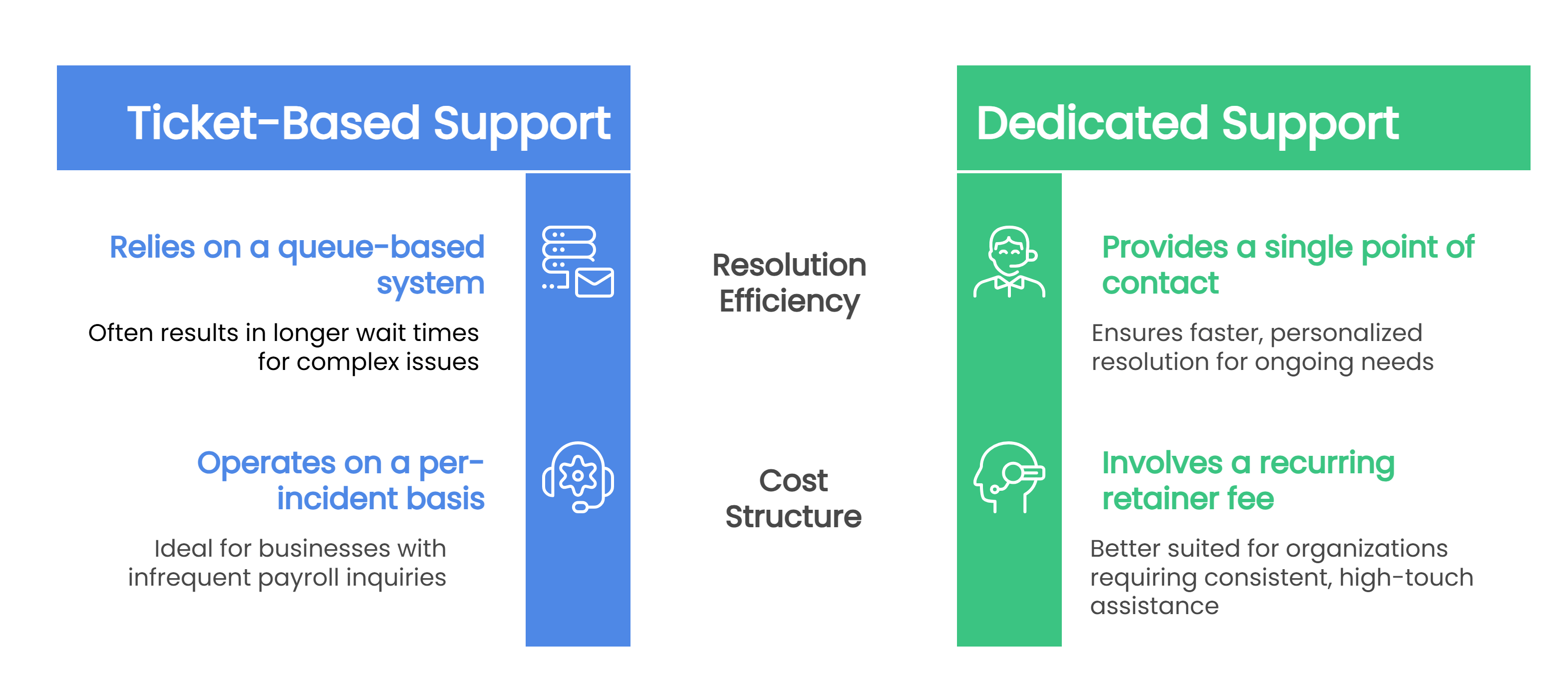
Support models vary widely. Some providers use a general call center or ticket queue. Others assign a named representative, a small service team, or different specialists for payroll, taxes, implementation, and HR questions.
None of these structures is automatically right or wrong. A large employer with an experienced internal payroll department may be comfortable with a more standardized, self-service model. A growing company with a small HR or finance team may place greater value on reaching someone who already understands its account.
|
Evaluation Area |
Platform-First Model |
Service-Focused Partner Model |
|
Day-to-day support |
General queue or rotating representatives |
Named contact or consistent team |
|
Account knowledge |
Information reviewed when each issue is opened |
Ongoing familiarity with payroll history and setup |
|
Escalation |
Formal ticket and escalation process |
Direct access to the person or team managing the issue |
|
Guidance |
Primarily self-service resources |
More hands-on assistance and explanation |
|
Best fit |
Teams comfortable managing the system independently |
Teams that value continuity and direct support |
Before signing, ask what happens if a payroll issue appears late in the processing cycle. Who should you contact? What are the usual response and escalation times? Will you work with the same people after implementation? The answers will help you determine whether the provider's support model matches the urgency of payroll.
If your current support experience already feels off, a payroll provider audit can help you spot the additional warning signs before they become bigger problems.
What Should Payroll Implementation Include?
A strong implementation plan transfers your data, configures the new system, tests calculations, and prepares your organization to run payroll successfully from day one. A capable platform can still produce problems if implementation is rushed or incomplete.
A clear implementation plan should address:
- A named implementation lead and defined responsibilities
- Employee demographic and payroll data conversion
- Year-to-date wages, taxes, deductions, and employer contributions
- State and local tax accounts and agency authorizations
- Earnings, deductions, garnishments, benefits, and paid-time-off rules
- General ledger, timekeeping, retirement, and benefits connections
- Payroll validation or parallel testing before launch
- Administrator, manager, and employee training
- A documented go-live date and post-launch support plan
Ask who validates the imported data and who signs off before the first live payroll. You should also know what happens if implementation is delayed or historical records do not transfer correctly. The proposal should distinguish the tasks the provider completes from the information and approvals your team must supply.
Timing matters too. A January 1st change can simplify year-to-date tax records, but it is not always the best or only time to switch. A well-managed midyear implementation is possible when year-to-date balances, tax filings, and employee records are carefully reconciled.
How Should You Evaluate a Payroll Provider's Data Security?
Evaluate a payroll provider's data security the way you would any system holding sensitive financial and personal information: ask specific questions rather than accepting general assurances. Payroll systems contain bank information, Social Security numbers, compensation data, tax records, and other sensitive employee information, so security should be part of the buying conversation, not an afterthought once implementation begins.
Ask prospective providers about:
- Multifactor authentication
- Role-based permissions
- Encryption during transmission and storage
- Login, access, and administrative audit logs
- Employee access after termination
- Backup and business continuity procedures
- Security incident notification practices
- Data retention and secure deletion
- Exporting records if you change providers
Your internal controls matter as well. Even a secure platform can be weakened by shared administrator accounts, excessive permissions, or delayed removal of former employees. Ask the provider how it helps clients configure access and periodically review user roles.
If the provider cannot explain its safeguards in understandable terms or provide appropriate security documentation, involve your IT or security team before signing.
Is Your Payroll Provider's Pricing Clear and Predictable?
Payroll pricing is rarely just one number. Expect a base fee, per-employee charges, per-payroll charges, implementation costs, and separate module fees layered together, and a low starting price may not represent the actual annual cost once tax filings, integrations, support, and year-end services are included.
For example, a 25-employee business on a full-service plan can land around $6,850 in modeled first-year cost once the base subscription, per-employee fees, implementation, tax filing, modules, and support are all counted, well above what the advertised base price alone suggests.
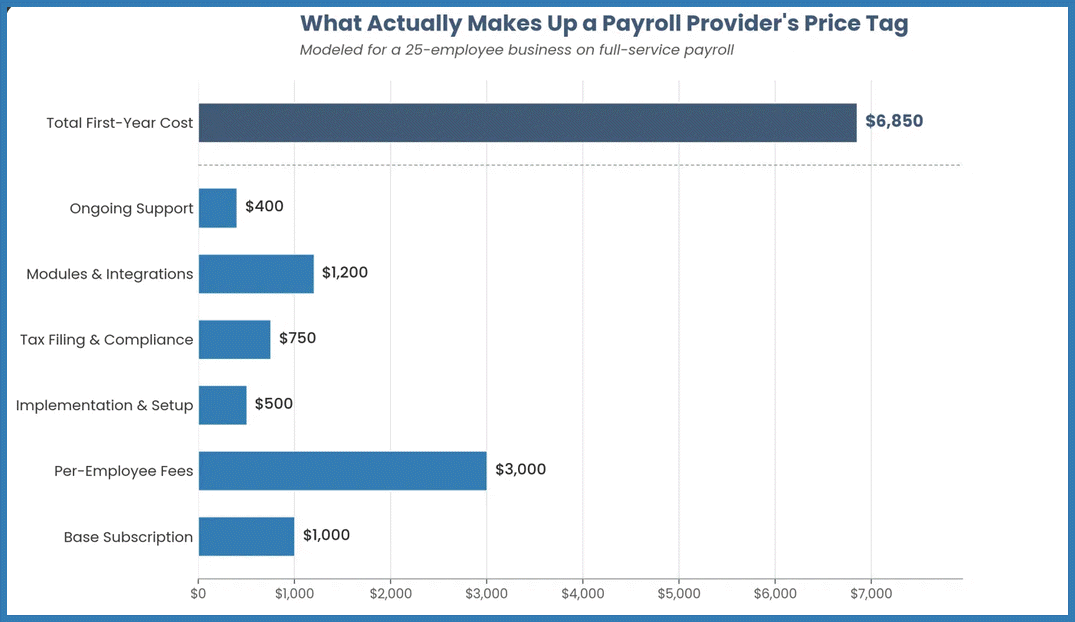 Figures are a blended model, not a real client quote or a single provider's rate card. Built from 2026 small-business payroll pricing ranges reported by Forbes Advisor, QuickBooks, Homebase, Milestone, TaxDome, and others (base fees roughly $40–$150/mo full-service, $6–$25/employee/mo, $50–$1,500 one-time implementation, $3–$20 per year-end form, $2–$8/employee/mo for add-on modules).
Request an itemized proposal that addresses:
- Base subscription or account fees
- Per-employee or per-payroll charges
- Implementation and data-conversion fees
- Federal, state, and local tax filing
- W-2 and 1099 preparation and delivery
- Off-cycle, correction, and bonus payrolls
- Timekeeping, scheduling, benefits, recruiting, or HR modules
- Integrations and custom reports
- Tax-notice support
- Training and ongoing support
- Contract renewal increases and termination fees
Compare providers using the expected first-year cost and ongoing annual cost, not just the lowest advertised price. Ask the provider to calculate a sample invoice using your current headcount, payroll frequency, locations, and required modules.
Price should still matter. A high-touch provider may cost more than a basic self-service platform, and that difference may not be worthwhile for every organization. The decision should reflect how much internal time, expertise, and support your team needs.
What Questions Should You Ask a Payroll Provider?
Use these twelve questions during every provider evaluation, and pay attention to how each answer is delivered, not just what it says. A strong provider answers specifically and in writing. A weak one hedges, defers, or answers a different question than the one you asked.
1. What is included in the quoted price, and what costs extra? A strong answer names specific inclusions and exclusions without hedging. If the response leans on "it depends" or defers every add-on to a future conversation, treat that as a sign the full cost won't be clear until after you've signed.
2. Who files our federal, state, and local payroll tax returns? A specific answer names the entity actually signing and submitting each filing, and whether that's included in your base plan or billed separately. If the response is vague about federal versus state and local returns, ask for that breakdown in writing before you sign.
3. Who responds to agency notices, and what happens if the provider causes an error? Listen for a provider that can describe its own correction and error process in concrete terms, ideally something documented in the agreement, not just a verbal assurance. Vague reassurance with no process behind it is a red flag.
4. Who will support us after implementation? The strongest answer introduces you to the actual person or team who takes over post-launch, not just the sales or implementation contact you've been working with. If nobody can tell you who owns your account after go-live, assume you'll be starting over with a stranger the first time something breaks.
5. What are your normal response and escalation times? Look for actual numbers, not "quickly" or "as soon as possible." A provider confident in its service model will give you a specific response-time commitment and explain what happens if that window is missed.
6. Can you demonstrate our actual payroll and reporting workflows? A provider willing to work through your real scenarios, not just their prepared demo script, is showing you how the system behaves under your conditions. Reluctance to move off the standard demo is worth noting.
7. Which of our current systems can integrate with your platform? The answer should distinguish between a native integration, a file-based workaround, and a custom build, since each carries a different cost and reliability profile. If every integration is described as "possible" with no distinction made, ask which category yours actually falls into.
8. What does implementation include, and who validates converted data? A solid answer names who signs off on your data before the first live payroll runs, not just who enters it. If validation is left entirely to your team with no review from the provider's side, that's extra risk sitting on your desk.
9. How do you protect payroll and employee information? A confident answer covers specific safeguards (multifactor authentication, encryption, access controls) without you having to ask a follow-up question. If security is answered in generalities, ask to speak with whoever owns it directly.
10. How can we export our data if we decide to leave? A provider confident in the relationship will answer this plainly, including format and turnaround time. Hesitation or a vague answer here often says more about the relationship than any other question on this list.
11. How will the platform and pricing change as our workforce grows? Look for a concrete answer about pricing tiers, added modules, or renegotiation points tied to headcount or complexity, not a general assurance that "the platform scales." Growth-stage businesses in particular should press for specifics here.
12. Can you provide a sample agreement and itemized first-year cost? A provider that hands this over without pushback is giving you what you need to compare offers on equal footing. Reluctance to put pricing in writing before you've signed is one of the clearest red flags on this list.
Frequently Asked Questions About Choosing a Payroll Provider
How Long Does It Take to Switch Payroll Providers?
A payroll provider transition may take several weeks to a few months, depending on workforce size, payroll complexity, integrations, tax registrations, and the condition of existing records. Ask each provider for a timeline based on your actual requirements. Build in enough time for data validation, training, and at least one complete payroll review before launch.
Is January 1st the Best Time to Change Payroll Providers?
January 1st can simplify year-to-date payroll and tax reporting, but businesses can change providers at other times of the year. A midyear transition requires accurate year-to-date wage, tax, deduction, and contribution balances. The quality of the conversion process matters more than choosing a particular calendar date.
Is the Cheapest Payroll Provider Usually the Best Choice?
Not necessarily. A low-cost, self-service platform may be a good fit for a small employer with simple payroll and strong internal expertise. A company with multiple states, complex pay rules, limited internal resources, or a need for direct support may receive more value from a higher-touch provider. Compare total cost, responsibilities, and service rather than the starting price alone.
Who Is Responsible if a Payroll Provider Makes a Tax Error?
The answer depends partly on the service agreement and the cause of the error. A provider may agree to correct its own mistake and pay related penalties, but employers generally remain responsible for ensuring federal employment tax obligations are met. Review the contract carefully and monitor deposits and filings instead of assuming all liability has transferred.
What Documents Should You Review Before Signing?
Review the proposal, service agreement, implementation plan, pricing schedule, data-security documentation, support terms, and any service-level commitments. Confirm that verbal promises about fees, response times, tax-notice support, or assigned representatives appear in writing.
Choose the Provider That Fits How Your Business Operates
Choosing a payroll provider is ultimately about finding the right combination of technology, responsibility, support, security, and cost for your organization. The provider with the longest feature list is not necessarily the one that will make payroll easier to manage.
Define your requirements before watching demonstrations. Test the system against your real workflows. Ask who owns each part of implementation, tax filing, issue resolution, and ongoing support. Then compare the written proposals using the same criteria.
At Lift HCM, we pair connected payroll and HCM technology with direct access to experienced people who understand your account, your workflows, and your priorities. If you are comparing providers and want a clearer way to weigh support, implementation, compliance, and long-term fit, we can help you work through the decision with practical guidance.

Topics:




.png?width=1536&height=1024&name=Create%20a%20background%20that%20reads%2c%20How%20Long%20to%20Keep%20P%20(1).png)