
HR administration software features that matter most for growing SMBs include a centralized employee database, automated onboarding, self-service access, integrated time and payroll, and built-in compliance alerts and audit trails, replacing manual spreadsheet tracking with one connected system.
If your HR process still runs through spreadsheets, shared folders, and paper forms, here's the challenge: the system that felt manageable at five employees often starts breaking down at 15, 25, or 50. Data gets duplicated. PTO balances get missed. Payroll inputs have to be re-entered. And when someone needs a document fast, your team ends up digging through folders instead of moving work forward.
At Lift HCM, we've worked with small and mid-sized employers across the country that hit this exact point. The issue usually is not effort. It's that spreadsheets were never built to handle onboarding, payroll coordination, compliance tracking, and employee recordkeeping in one place.
That's exactly what this guide is built for. Below, you'll see the 11 HR administration software features that matter most when you're replacing manual processes with one connected system.
Key Takeaways
-
Centralizing employee data reduces duplicate entry, version-control issues, and inconsistent records.
-
Automated onboarding, PTO tracking, and document workflows cut administrative work and lower compliance risk.
-
Employee self-service helps your team spend less time answering routine questions and making basic profile updates.
-
Time, payroll, benefits, and HR records work better when they share one system instead of passing data back and forth.
-
Audit trails, document storage, and compliance alerts make it easier to stay organized and audit-ready as you grow.
Table of Contents
Why Do Spreadsheets Fall Short for HR Administration?
Spreadsheets work fine for basic tracking, but they break down as your headcount grows. The more employees you add, the more manual entry errors creep in. That's especially true when the same data lives in five different files that each need updating by hand.
SHRM's 2025 State of the Workplace report found that 62% of HR professionals worked beyond their normal capacity last year. And 57% said their department didn't have enough staff for the workload.
Spreadsheets also turn version control into a guessing game. Did someone save over the main copy? Is this file from last week or last quarter? These aren't rare problems. They happen constantly, and they eat up time you could spend growing your business.
|
HR Task |
Spreadsheet-Based Process |
HR Administration Software |
|
Employee Data Updates |
Employee information is stored across multiple files, folders, or paper records. Updates have to be entered manually in each place, which increases the risk of outdated or inconsistent records. |
Employee information is centralized in one record that connects across payroll, time, benefits, and reporting. Update it once, and the change flows through the system. |
|
Onboarding |
New hire forms are collected through paper, email, or shared folders. Missing documents can be hard to spot until they become a compliance issue. |
Automated workflows send the right forms, collect signatures, and flag incomplete paperwork before deadlines are missed. |
|
Compliance Tracking |
Deadlines, form changes, and retention requirements rely on manual reminders or individual employee follow-up. |
Built-in alerts, document storage, and audit trails help HR teams stay ahead of key deadlines and maintain complete records. |
|
Time, PTO, and Attendance |
Hours, PTO balances, and leave requests are tracked by hand, then manually entered into payroll. Errors can happen when policies, overtime, or accruals change. |
Time tracking, PTO requests, accruals, and payroll data are connected, which reduces duplicate entry and improves accuracy. |
|
Reporting |
Reports are built manually from spreadsheet data that may not be current. Pulling answers for leadership can take extra time. |
Real-time reporting and analytics provide current views of turnover, overtime, payroll, and workforce trends without rebuilding reports from scratch. |
11 HR Admin Software Features That Replace Manual Processes
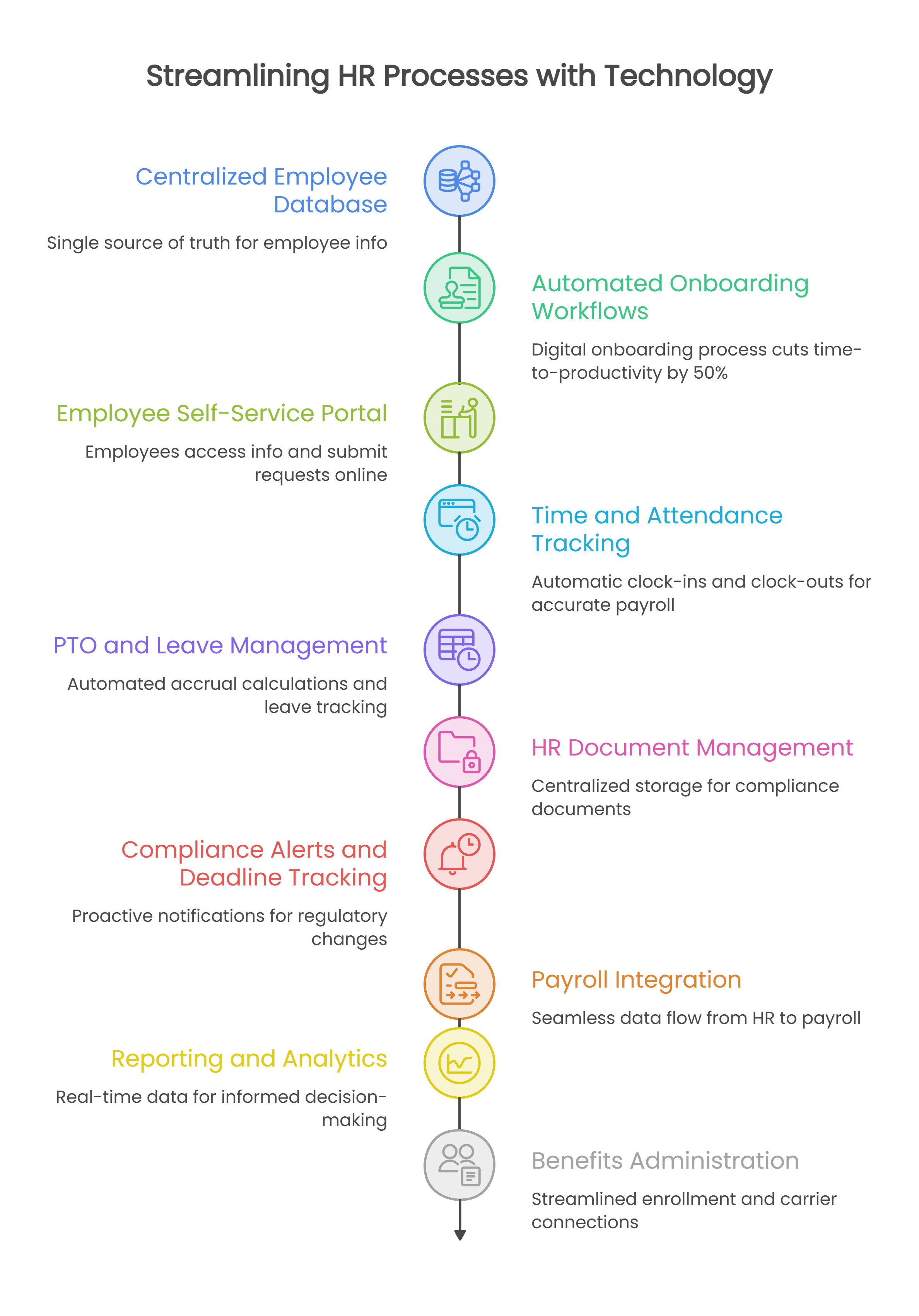
The right HR administration software takes repetitive tasks off your plate and keeps employee data accurate across every system. Here are the 11 features that deliver the most value for SMBs moving away from spreadsheets and paper.
1. Centralized Employee Database
A single source of truth for all employee information is the foundation of any HR administration platform. When someone gets promoted, changes their address, or updates their tax withholding, that change should flow automatically to payroll, benefits, and reporting.
With spreadsheets, an employee status change might need updates in six different files. Miss one, and you have inconsistent records that affect payroll calculations and compliance documentation. A centralized database eliminates that risk by keeping everything connected.
2. Automated Onboarding Workflows
New hire paperwork stacks up quickly. Offer letters, tax forms, direct deposit, handbook acknowledgments, and policy sign-offs all have to be completed on time and stored correctly.
Automated onboarding workflows help you assign the right tasks, collect the right forms, route approvals, and flag missing documents before they become a problem. That matters even more if your team does not have dedicated HR staff managing each step by hand.
At Lift HCM, we've seen onboarding become one of the first breaking points for spreadsheet-based HR because so many steps depend on timing, follow-up, and documentation.
3. Employee Self-Service Portal
How much time do you spend answering basic questions? "What's my PTO balance?" "Where can I find my last pay stub?" "How do I update my address?" These requests add up, especially if your HR responsibilities sit on top of other duties.
An employee self-service portal lets employees access their own information without emailing you for it. That includes pay history, benefits details, time-off balances, and tax documents. It also lets them submit address changes, direct deposit updates, and time-off requests directly, which cuts down on data entry errors.
4. Time and Attendance Tracking
Tracking hours worked is straightforward when you have five employees. At 15 or 25, it becomes a serious time drain. Handwritten timesheets mean manual data entry, which means errors in overtime calculations and missed meal breaks.
Time and attendance software captures clock-ins and clock-outs automatically, calculates overtime based on your rules, and feeds that data directly into payroll. No more transcribing hours from paper to spreadsheet to payroll system.
For organizations with hourly teams, shift work, or multiple locations, this feature moves from helpful to essential very quickly.
5. PTO and Leave Management
PTO and leave tracking is simple until it isn't. Accruals change. Policies vary. Managers need visibility. Employees want answers fast.
Leave management tools automate accrual calculations, track balances against policy rules, and give employees and managers a clearer approval process. Instead of relying on someone to update a spreadsheet correctly every time, the system applies the rules consistently.
That improves the employee experience and reduces the chance of disputes over balances, approvals, or policy application.
6. HR Document Management
Paper files scattered across cabinets and shared drives create compliance headaches. When an auditor asks for a specific employee's I-9 or performance review, how long does it take you to find it?
HR document management software stores everything in one secure location with role-based access controls. According to DynaFile research on HR compliance, centralized document storage, controlled access permissions, and automated indexing help HR teams maintain complete employee files and respond quickly to compliance requests.
7. Compliance Alerts and Deadline Tracking
Employment regulations change frequently. Minimum wage increases, new paid leave requirements, updated I-9 forms, keeping track of what applies to your business takes constant attention.
Compliance management features send alerts when deadlines approach and flag records that need attention. Instead of relying on memory or manual calendar reminders, you get proactive notifications that help you stay ahead of regulatory changes.
This is especially important for employers managing growth, multi-state teams, or lean HR operations.
8. Payroll Integration
When time tracking, employee data, and payroll live in separate systems, every pay run requires manual reconciliation. You're exporting data, reformatting it, and hoping nothing falls through the cracks.
Payroll integration connects employee data, time records, deductions, and pay changes so they move through one process instead of several disconnected ones. That reduces errors and helps your team spend less time rechecking basic information.
For many SMB employers, this is where the real value becomes obvious. Better HR administration is not just about recordkeeping. It is about making payroll more accurate and easier to manage.
9. Reporting and Analytics
Spreadsheets can generate reports, but building them takes time, and the data is only as current as your last manual update. When leadership asks about turnover trends or overtime costs, how long does it take to pull those numbers together?
HR reporting tools generate standard reports on demand and let you build custom views for specific questions. Real-time data means you're working with current information, not last month's snapshot.
10. Benefits Administration
Managing benefits enrollment through spreadsheets and paper forms creates confusion for employees and administrative burden for you. Who's eligible? What did they choose? Did their changes go through?
Benefits administration tools handles open enrollment, tracks eligibility, and connects to carriers for seamless updates. Employees can compare options, make selections, and see confirmation, all in one place.
11. Audit Trails and Record Retention
When regulators or auditors come calling, you need to show who made changes, when they made them, and what the records looked like at any point in time. Spreadsheets don't track that history reliably.
Audit trail features log every change to employee records with timestamps and user information. Combined with automated retention rules, you can demonstrate compliance even years after the fact.
If compliance and documentation matter to your business, this is not a nice-to-have feature. It is part of protecting the business.
What Makes HR Administration Software Worth the Investment?
Moving from spreadsheets to dedicated software isn't just about features. It's about time. Every hour you spend copying data between systems, fixing errors, and answering routine questions is an hour you're not spending on work that moves your business forward.
That time adds up fast. Remember the SHRM finding from earlier: 62% of HR professionals worked beyond their normal capacity last year, and more than half said their department didn't have enough staff for the workload. Most of that overflow isn't strategic work, it's the manual entry, chasing down paperwork, and answering repeat questions that spreadsheets create by design. Software doesn't fix a staffing shortage on its own, but it removes the busywork that makes a lean HR function feel understaffed in the first place.
The right platform reduces that administrative load while improving accuracy and keeping you compliant. For SMBs without a full HR department, that combination makes a real difference, especially as headcount climbs past the point where a spreadsheet can keep up.
How Do You Choose the Right HR Administration Platform?
Start by identifying your biggest pain points. Are payroll errors eating up your time? Is compliance documentation scattered across too many locations? Do you spend hours each week answering the same employee questions?
Look for platforms that address those specific problems first. Then consider how the system will scale as you add employees, locations, or states. The goal is a solution that works today and still fits three years from now.
Key questions to ask:
- Does the platform integrate payroll, time, and HR records in one system?
- Can employees access their own information through a self-service portal?
- How does the provider handle compliance updates and regulatory changes?
- What support do you get when something goes wrong?
FAQs About HR Administration Software Features
What is HR administration software?
HR administration software is a platform that centralizes employee records, automates HR tasks, and manages processes like payroll, time tracking, and benefits enrollment. Lift HCM offers an integrated HR administration system that brings these functions together in one place.
How do I know when it's time to move off spreadsheets?
If your team is re-entering employee data, chasing documents, correcting payroll inputs, or struggling to keep records current, it is usually time to move to a more connected system. Many growing employers reach that point once headcount, locations, or compliance requirements become harder to manage manually.
Can HR administration software help with compliance?
Yes, but the level of support varies by platform. Many systems offer deadline reminders, document storage, audit trails, and workflow controls that help you stay organized. Some providers also offer more hands-on compliance support.
What's the difference between HRIS and HR administration software?
The terms are often used interchangeably. In many cases, HRIS (Human Resource Information System) refers to the system that stores and manages employee data, while HR administration software may describe a broader set of workflows that includes onboarding, compliance, payroll coordination, and benefits support.
How long does it take to implement HR administration software?
Implementation timelines depend on your company size, data cleanliness, and system complexity. Most businesses can expect the process to take anywhere from two weeks to six months.
Has Your HR Team Outgrown Spreadsheets?
If spreadsheets are still holding together your HR process, you may already be spending more time maintaining the system than benefiting from it.
The right HR administration software helps you centralize records, automate onboarding, support employee self-service, improve payroll accuracy, and stay better organized for compliance. That does not just make HR easier to manage. It gives your business a stronger operational foundation as you grow.
At Lift HCM, we help small and mid-sized employers replace disconnected HR processes with a more connected approach to Payroll & Tax Management, HR Administration, Workforce Management & Time Tracking, Benefits Administration, and Integrations. If you want a clearer view of where your current process is breaking down, the next step is a focused review of your workflows, recordkeeping, and payroll handoffs so you can see where the risk and extra work are really coming from.

Topics:


.jpg?width=3000&height=2000&name=image%20of%20people%20pushing%20clock(1).jpg)

.jpg?width=1344&height=768&name=a%20software%20interface%20showcasing%20payroll%20management%20tools(1).jpg)
.jpeg?width=1024&height=1024&name=An%20image%20of%20a%20cloudbased%20payroll%20system%20with%20realtime%20accessibility%2c%20enhanced%20security%2c%20seamless%20integrations%2c%20scalability%2c%20and%20costeffectiveness%20bene-2(1).jpeg)
.jpeg?width=1344&height=768&name=icons%20of%20benefits%20administration%20software%20for%202025(1).jpeg)
.png?width=2000&height=1376&name=payroll%20software%20image(1).png)

-1.jpg?width=1000&height=550&name=Businessman%20hand%20typing%20with%20cloud%20technology%20system%20and%20office%20symbol%20concept%20(1)-1.jpg)